Best Poker Software for Mac 2026: A Mac User's Honest Take
Running poker software on macOS in 2026? I've tested HUDs, solvers, and trainers on M-series Macs. Here's what works natively and what to avoid.
Best Poker Software for Mac 2026: A Mac User's Honest Take
I switched to Mac as my primary poker setup in 2021 and immediately regretted it. PokerTracker had a Mac version but the interface looked subtly off. Hold'em Manager 3 required CrossOver and felt sluggish. The solver I was using at the time had no Mac support at all and I had to keep my old Windows desktop running just for that one tool. Within three months I was looking at Boot Camp tutorials.
Then a few things happened. Apple Silicon shipped and the performance gap with Windows closed entirely. Browser-based solvers like GTO Lab and GTO Wizard launched, eliminating the OS dependency for the most-used study tool. PokerTracker overhauled their Mac client. Most poker sites finally produced reliable native macOS clients. By 2024 the Mac poker experience was actually competitive with Windows.
In 2026, I do my entire grind on a M3 MacBook Pro. No Boot Camp. No Parallels. No regret. But I had to learn which tools work natively, which ones require workarounds, and which ones are just flat-out not viable on Mac. This guide is what I wish someone had handed me in 2021.
I'm going to walk through every category of poker software with specific Mac-vs-Windows considerations. I'll tell you what runs natively, what requires CrossOver/Parallels, and what to skip entirely. By the end you'll know exactly what to buy if you're a Mac primary player in 2026 — and what to avoid even if everyone else recommends it.
The Mac Reality in 2026
Let me set the scene. Apple Silicon Macs (M1 through M4) are now four years into the market. They're fast, efficient, and run macOS native software brilliantly. They run Windows software via emulation/translation layers (Rosetta, CrossOver, Parallels) with some performance overhead but generally acceptable user experience.
Most poker software companies have responded by either:
- Building native Mac versions (PokerTracker, GTO Lab, GTO Wizard, most poker sites)
- Officially supporting CrossOver / Wineskin (Hold'em Manager 3, some legacy tools)
- Going browser-only (GTO Lab, GTO Wizard, InstaGTO, PokerSnowie)
- Remaining Windows-only with no support (DriveHUD 2, some old solvers)
The browser-only category has been the biggest win for Mac users. Five years ago, "Mac poker software" largely meant "Windows poker software with a wrapper." Now most modern study tools are browser-based and work identically on any OS. That's removed 80% of the historical Mac headaches.
What's left is a smaller set of tools where OS still matters, and a smaller still set of tools where Mac users have to make compromises.
HUDs and Tracking Software on Mac
This is the category that most often forces Mac users to compromise. Real-time HUDs need to read your poker client's window properties to position stat overlays correctly. That requires deeper OS integration than a browser app, and not every HUD vendor has invested in Mac support.
PokerTracker 4 — Native Mac version. $99.99 one-time. This is what I use. The Mac client has been mature since around 2014 and runs natively on Apple Silicon. Auto-import works, the HUD displays correctly on PokerStars and other major sites, the database performance is excellent. Some advanced features (specifically certain custom report builders) feel slightly less polished than the Windows version, but for 95% of use cases the experience is identical.
Granular Mac considerations: you must grant PT4 screen recording permission in System Preferences > Privacy & Security > Screen Recording. Without this, the HUD won't appear on tables. This was a 2020+ macOS change and trips up nearly every new Mac PT4 user. Also: Apple Silicon Macs run PT4 natively (no Rosetta), so performance is as good as Windows.
Hold'em Manager 3 — Not native. Requires CrossOver (paid third-party software, around $74 one-time as of 2026) or Parallels (subscription). Performance is OK but slightly laggier than native. The HUD overlays can be finicky depending on your CrossOver bottle configuration. NoteTracker — HM3's killer feature — works through the wrapper but feels less polished.
If you specifically want HM3 features (NoteTracker, in-game polish), the wrapper experience is workable. If you don't have a strong reason for HM3, PT4's native Mac support is the better path.
DriveHUD 2 — Windows only. No Mac version, no wrapper support officially endorsed. If you play on Bovada/Ignition, you have a hard problem on Mac — the only Bovada-compatible HUD doesn't run on your OS. Workarounds involve running Windows in Parallels or Boot Camp (Boot Camp is no longer available on Apple Silicon, so Parallels is the realistic option).
Hand2Note — Windows only with limited wrapper support. Some users get it running via CrossOver but the experience is rougher than PT4 native.
The verdict on HUDs: PokerTracker 4 is the obvious pick for most Mac users. It runs native, costs once, and just works. If you specifically need HM3 features or play on Bovada, plan for the wrapper friction or run Windows in a VM.
Solvers on Mac
This is where Mac users have made the biggest gains in 2026. Browser-based solvers have eliminated almost all OS dependence.
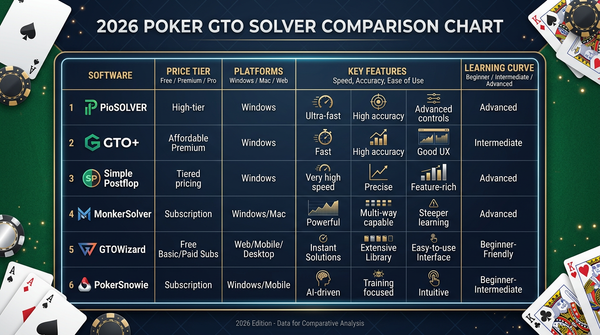
GTO Lab — Browser-based. Runs identically on any OS with a modern browser. ~$49/month or $399/year. My current daily driver. Performance on M-series Macs is excellent (the actual solving happens on the server side). The trainer mode, library lookups, and saved sims all work without any Mac-specific friction.
GTO Wizard — Also browser-based. Same story — identical experience on Mac and Windows. $49–$99/month. Premium tier earns its price for serious multi-format study.
InstaGTO — Browser-based. ~$29/month. Cash-focused budget option, works fine on Mac.
PokerSnowie — Browser-based with optional desktop apps. The browser version works on Mac without issues. $29/month.
PioSolver — Windows native, no Mac version. The classic desktop solver that defined this category. If you specifically need PioSolver, you're running Windows in Parallels or accepting that this isn't the tool for you. For most use cases, GTO Lab and GTO Wizard have closed the gap and the lack of native Mac support for Pio is no longer a meaningful problem.
Simple Postflop — Windows native, similar story to Pio. Niche tool, no Mac plan.
Open-source solvers (TexasSolver et al.) — Source code can be compiled on Mac with some effort. For most users this is too much friction.
The verdict on solvers: any Mac user can run a top-tier solver in 2026 without compromise. GTO Lab is the cleanest experience for most players. You don't need Windows for solver work anymore.
Poker Sites and Clients
The actual poker clients you play on. Site availability varies by region but the major sites have all addressed Mac users by 2026.
PokerStars — Native Mac client. Solid. Works with PT4 and (via wrapper) HM3.
GG Network (GGPoker, GGPoker UK, etc.) — Native Mac client. Also solid.
partypoker — Native Mac client. Works fine.
888poker — Native Mac client. Functional but the UI feels dated.
Winamax — Native Mac client (for European markets where it's available). Works well.
Bovada / Ignition — Browser-based play in 2026 (no native client). Works on Mac. The Bovada problem on Mac isn't the client — it's the lack of HUD support for the network.
WPT Global / GG-network sister sites — Mostly native Mac.
For the most part, Mac users can play on any major site they want. The post-2020 wave of native Mac clients has solved this problem.
Equity Calculators on Mac
Equilab — Windows only. Available on Mac via CrossOver but the install is finicky. As an alternative, several browser-based equity calculators have emerged that work natively on any OS.
Flopzilla — Windows only. Similar situation to Equilab.
PokerCruncher — Native Mac (and iOS). Paid one-time. This is the Mac-native equivalent to Equilab. Good interface, all the features you'd expect, $20–$30 one-time depending on edition.
Browser-based calculators — There are several free or low-cost browser-based equity tools in 2026. They work fine on Mac.
For most Mac users, PokerCruncher is the right pick. Pay once, native macOS app, no wrappers. Browser alternatives work for occasional use.
Range Trainers and Other Study Tools
Most modern range trainers are browser-based and work on Mac without issues. This includes the trainer modes built into GTO Lab and GTO Wizard.
Standalone iOS apps (for iPhone/iPad) are increasingly common for preflop range drilling. These work on Mac via Apple Silicon's iPad app support. So a "preflop trainer iPad app" is also a "preflop trainer Mac app" if you have an Apple Silicon Mac. This is underappreciated and worth exploring.
Poker Academy and similar training sites are browser-based. Work on Mac.
The Wrapper Question: When Is CrossOver Worth It?
CrossOver is paid software (around $74 one-time, $94 with 12 months of updates) that lets you run Windows applications on Mac without a full Windows install. It's based on the open-source Wine project but with commercial polish and support.
For poker users, CrossOver is realistically used for:
- Hold'em Manager 3 (if you specifically want HM3 features)
- DriveHUD 2 (if you play on Bovada and have no other options)
- Older Windows-only solvers (PioSolver, Simple Postflop)
- Equilab, Flopzilla (both have Mac alternatives, so usually unnecessary)
When CrossOver makes sense: you have one or two specific Windows tools you can't replace. The $74 buys you a workaround that's cleaner than running a full Windows VM.
When CrossOver doesn't make sense: you'd be running it for a single tool that has a perfectly good Mac-native alternative. Don't buy CrossOver to run Equilab when PokerCruncher exists. Don't buy it for HM3 if PT4 fits your needs.
I tried CrossOver in 2022 for HM3 specifically. It worked. It also added enough small friction (occasional rendering glitches, the bottle configuration to maintain, the slight performance overhead) that I migrated back to PT4 native and never looked back.
Parallels: When Full Windows Becomes Necessary
Parallels Desktop runs a complete Windows VM on Mac. It's a subscription (around $99/year as of 2026 for the Pro edition). It gives you a real Windows environment with full compatibility, at the cost of running an entire OS on top of macOS.
For poker users, Parallels makes sense in narrow cases:
- You play on Bovada/Ignition and need DriveHUD 2 with a real Windows environment
- You use multiple Windows-only tools simultaneously and CrossOver gets too messy
- You're a dev or power user who wants Windows for non-poker reasons too
For most Mac poker players, Parallels is overkill. You'd be running an entire OS to use one or two apps. The subscription cost adds up. The performance overhead is real on integrated graphics.
I don't run Parallels currently. The browser-based solver shift made it unnecessary for me.
Apple Silicon Performance Notes
Specific to M-series Macs (M1, M2, M3, M4):
Native Mac apps run as fast as or faster than equivalent Windows apps on comparable hardware. PT4 native on an M2 MacBook Pro is snappier than PT4 on most mid-range Windows laptops. This wasn't true on Intel Macs.
Rosetta 2 (Apple's Intel-to-ARM translation layer) handles Intel Mac apps without meaningful performance penalty for poker software. PT4 ran on Rosetta when Apple Silicon launched and you couldn't tell.
CrossOver runs Windows x86 apps via a translation layer. Performance is roughly 70–85% of native Mac performance for most tasks. For poker software specifically, this means HM3 in CrossOver feels slightly less responsive than HM3 on Windows, but it's usable.
Parallels runs a full Windows VM. With proper allocation (8GB RAM minimum to the VM), Windows apps run at near-native speed. Battery life takes a meaningful hit when the VM is active.
For most poker workflows, an M-series Mac running native software is the best experience available. The performance, battery life, and silence (no fans in MacBook Air, mostly silent in Pro) are genuinely better than Windows laptops at similar price points.
Comparison Tables
| Tool | Mac support (2026) | Recommended approach |
|---|---|---|
| PokerTracker 4 | Native | Install directly |
| Hold'em Manager 3 | Wrapper required | CrossOver if features matter |
| DriveHUD 2 | Windows only | Parallels if Bovada-essential |
| Hand2Note | Limited wrapper | CrossOver if you can tolerate friction |
| GTO Lab | Browser-based | Use directly |
| GTO Wizard | Browser-based | Use directly |
| InstaGTO | Browser-based | Use directly |
| PokerSnowie | Browser-based | Use directly |
| PioSolver | Windows only | Parallels if essential, otherwise switch to GTO Lab/Wizard |
| Equilab | Windows only | Use PokerCruncher or browser equity tool instead |
| PokerCruncher | Native Mac | Direct Mac app |
| Use case | Best Mac stack | Annual cost |
|---|---|---|
| Pure beginner | Free HUD tier + free YouTube + browser equity tool | $0 |
| Low-stakes serious | PT4 + GTO Lab + PokerCruncher | ~$520/yr |
| Mid-stakes regular | PT4 + GTO Wizard + PokerCruncher + occasional coaching | $700–$1500/yr |
| Bovada player on Mac | Parallels + DriveHUD 2 + GTO Lab | $600+ first year |
| Multi-format pro | PT4 + GTO Wizard premium + PokerCruncher | $1500+/yr |
| Mac-specific gotcha | Fix |
|---|---|
| HUD not appearing on tables | Grant Screen Recording permission in System Preferences |
| HM3 lag in CrossOver | Allocate more memory to the bottle |
| DriveHUD 2 won't run | Use Parallels with full Windows |
| Equilab unavailable | Use PokerCruncher (~$25 one-time) |
| PioSolver missing | Use GTO Lab or Wizard for browser-based solving |
| Poker site client won't open | Check site has native Mac client; some require browser play |
My Current Mac Stack
For transparency, here's what's running on my M3 MacBook Pro right now:
- HUD: PokerTracker 4 native Mac client (one-time $99.99 paid years ago)
- Solver: GTO Lab in browser (annual subscription)
- Equity: PokerCruncher native Mac app (paid once)
- Poker sites: PokerStars and GGPoker native Mac clients
- No CrossOver, no Parallels. Don't need them.
Total ongoing software cost: ~$400/year for GTO Lab. Everything else is paid once.
This is the cleanest Mac poker setup I've had in five years. No fan noise during sessions, instant wake from sleep, decent battery life when traveling. The thing that made it possible was the browser-based solver wave — once I didn't need Windows for solver work, the rest fell into place.
Things I Wish I'd Known About Mac Poker Setup
A few specific lessons from my Mac poker journey.
Permissions matter. macOS's privacy controls block screen recording, accessibility access, and other features that HUDs need. PT4 needs Screen Recording. Some clients need Accessibility. Granting these properly takes 5 minutes and prevents hours of debugging.
Apple Silicon is enough. Don't think you need an Intel Mac for poker compatibility. The M-series Macs run everything modern poker tools require, often better than Intel.
Browser solvers killed the Windows requirement. This is the single biggest 2020s development for Mac poker users. A few years ago, "you need Windows for serious poker study" was true. Now it isn't.
Parallels is rarely worth it for poker only. If you don't already need Windows for other reasons (work, gaming, etc.), running Parallels for poker is overkill. CrossOver is cheaper and lighter for the rare Windows-only tool you might need.
Battery life during sessions. A serious 4-hour grind on a MacBook Pro draws meaningful battery if you're running PT4 + browser solver + poker client. Plug in for any session over 90 minutes if you're on an Air; Pros can usually go full session unplugged.
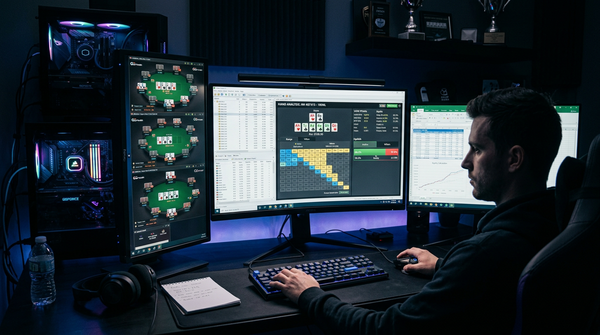
External monitor matters. I run a 32" 4K external when grinding from my desk. The tab/HUD/popup workflow benefits from screen real estate. The MacBook screen alone is usable for 2-tabling but cramped beyond that.
The Verdict
In 2026, Mac is a first-class poker platform for the first time in history. If you're a Mac primary user and you've been hesitating to move your poker workflow over because of historical compatibility issues, those issues are largely resolved.
The recommended stack for most Mac users:
- PokerTracker 4 for HUD and database — native, one-time, just works.
- GTO Lab for solver work — browser-based, no OS friction.
- PokerCruncher for equity — native Mac, alternative to Equilab.
- Native poker site clients for the rooms you actually play on.
This stack costs about $520 in year one ($99.99 PT4 + $399 GTO Lab + ~$25 PokerCruncher) and $399/year ongoing. It runs natively on Apple Silicon. No wrappers, no VMs, no compromise.
The exceptions: if you specifically play on Bovada/Ignition, you need DriveHUD 2, which requires Windows. Either run Parallels or accept that the HUD experience will be worse than Windows users have. If you specifically want Hold'em Manager 3's NoteTracker, plan for CrossOver and the friction it brings.
For everyone else: stop thinking Mac is a compromise. In 2026, it's a legitimate poker primary platform. Set up the recommended stack this weekend, grant the required permissions, and start grinding. The setup that took me three years of trial and error to land on is now available to anyone willing to follow the guide above.
The browser-based solver shift was the inflection point. It happened. Mac users won. Make the most of it.
A Day-One Setup Walkthrough on a Fresh Mac
If you just got a new MacBook and want to set up a clean poker stack today, here's the order I'd do it in. Total time is around 2–3 hours including the customization.
Step 1: macOS housekeeping. Run all pending updates. Don't try to set up poker software with a pending Sonoma or Sequoia update queued — it'll restart at the worst possible time. Get all updates applied first.
Step 2: Privacy and Security pre-permissions. Open System Settings > Privacy & Security. You'll come back here repeatedly. Familiarize yourself with where Screen Recording, Accessibility, and Input Monitoring permissions live. Mac is more permission-paranoid than Windows and most poker tools need at least one of these to function.
Step 3: Install your poker site clients. Get the actual rooms you play on installed first. PokerStars and GGPoker both ship native Mac clients in 2026 — download from the official sites, drag to Applications. Bovada is browser-only on Mac. Verify each client opens, you can log in, and hand history saving is enabled in client settings (this is critical — many players skip this and wonder why their HUD shows nothing).
Step 4: Install PokerTracker 4. Download the native Mac DMG from pokertracker.com. Drag to Applications. Open. macOS will ask you to grant Screen Recording permission — go to System Settings > Privacy & Security > Screen Recording, toggle PT4 on, restart PT4. This is the #1 thing new Mac PT4 users get stuck on.
Step 5: Configure PT4 auto-import. Within PT4, set up auto-import for each poker site you play on. The app walks you through it. Verify it works by playing one practice hand and confirming it appears in the database within 30 seconds. If not, the hand history path is wrong — fix before moving on.
Step 6: Customize the HUD layout. PT4's default HUD is too cluttered to use as-is. Spend 60 minutes building a layout with 5–7 stats you actually use, color-coded for player type ID (loose-passive vs tight-aggressive, etc.). Build a popup for deeper drilling. This is the step most players skip and regret.
Step 7: Sign up for GTO Lab. Browser-based, no install. Start the trial. Bookmark the URL in your browser's bookmarks bar. The first day, just click around — don't try to learn anything specific.
Step 8: Install PokerCruncher. Mac App Store, ~$25 one-time. Native Mac, takes 30 seconds. This is your equity calculator replacement for Equilab.
Step 9: Configure backups. Time Machine is fine. Or Backblaze. Or a manual weekly copy of your PT4 database to an external drive. Database corruption happens; backups turn catastrophic into annoying. Do this before you have hands worth losing.
Step 10: First session sanity check. Play one practice session before grinding for real. HUD overlays appear on tables. Stats update in real time. Hand histories save and import. Solver loads in browser. If anything fails, fix before risking real money.
That's the full Mac setup. Total cost: $99.99 PT4 + $25 PokerCruncher + GTO Lab subscription. Total time: about 3 hours including the HUD customization. Done once, runs for years.
The Spots Where Mac Setup Differs Most From Windows
A few specific places where my Mac workflow diverges meaningfully from a Windows equivalent. Worth knowing if you're switching platforms or running both.
Permissions every time you update macOS. When macOS does a major version update (Sonoma to Sequoia, etc.), Screen Recording permissions for poker apps occasionally reset. First session after a major OS update: verify HUD is appearing before grinding. I've been caught by this twice. Now it's part of my post-update routine.
Window arrangement is different. macOS handles multiple table windows differently from Windows. Tools like Stack & Tile (popular on Windows) don't have direct Mac equivalents. I use Mission Control and dedicated Spaces to manage 4-table grinds. For more than 6 tables, Mac genuinely struggles compared to Windows — that's a real platform limitation, not a workaround.
Right-click is two-finger tap or trackpad-corner. If you came from Windows you'll fumble this in PT4 for a few days. Configure your trackpad gestures to make right-click intuitive before you start serious sessions.
External monitor is more important on Mac. The MacBook screens are brilliant but small (14" or 16" Pro). For grinding, plug into a 27" or 32" external. The MagSafe + USB-C dock setup keeps it clean. I run a 32" 4K and the workflow is dramatically better than laptop-screen-only.
Battery life requires planning. A 4-hour grind on battery alone (PT4 + browser solver + poker client + maybe Discord) draws meaningful battery on a MacBook Air. MacBook Pros handle it better but still degrade. Plug in for any session over 90 minutes if you want to be safe.
No equivalent to Boot Camp on Apple Silicon. Boot Camp (running Windows natively on Mac) doesn't exist on Apple Silicon Macs. If you genuinely need a Windows tool, Parallels is the only realistic option. This isn't a regression — Parallels works well — but it's a planning consideration if you assumed dual-booting was available.
What I'd Tell Someone Buying Their First Mac for Poker
If you're considering switching to Mac primary or buying your first MacBook for grinding, this is the unfiltered advice.
Get the M-series, not Intel. Even refurbished, an M1 MacBook Pro is dramatically better than an Intel Mac for poker workflows. The performance, battery life, and silence are step-changes. Don't save money by buying old Intel hardware.
16GB RAM minimum, 24GB if you can afford it. PT4 + browser solver + poker client + Chrome with multiple tabs + Discord = around 12GB RAM use during a session. 8GB Macs swap aggressively under this load and feel sluggish. 16GB is comfortable. 24GB is future-proof.
Storage matters less than you think. PT4 databases are reasonably small even with millions of hands. 512GB SSD is plenty for poker. Don't overspend on 2TB unless you have other storage needs.
MacBook Pro over MacBook Air for serious grinding. The Pro has better thermals (sustained performance during long sessions), a brighter screen for long stints, and better speakers if you sometimes grind to background podcasts. The Air is great for travel but the Pro is the grinding machine.
Skip the most expensive specs. M3 Pro or M4 Pro is enough. M3 Max or M4 Max is overkill for poker — the performance gain doesn't translate to better poker workflows. Save the $500–$1000 for a better external monitor instead.
Buy AppleCare if you grind for a living. Three years of coverage for ~$200–$300 is cheap insurance against the one repair that would cost $800+. If poker is your income source, the math is unambiguous.
Don't buy CrossOver until you know you need it. Most Mac users won't. The browser-based solver wave eliminated 80% of the historical reasons. Buy CrossOver only if you've identified a specific Windows-only tool you can't replace.
Six Months Later: Has the Mac Story Changed?
I wrote a version of this guide six months ago and the answer to "is Mac viable for poker in 2026?" is still yes. A few specifics have shifted.
More native Mac apps for poker. A few smaller poker tools I'd previously listed as Windows-only have shipped Mac versions in the last six months. The trend is unambiguous — software vendors are recognizing the Mac user base is large enough to justify native ports. Bovada-network HUD support is still the holdout, but everywhere else the gap has narrowed.
Apple Silicon thermals on long sessions. I've now done several 8-hour grinding sessions on my M3 MacBook Pro. The fans never spin up audibly. The chassis stays cool. This was not true of Intel Macs running PT4 + browser solver, where the fans would scream and the keyboard would get hot. The Apple Silicon advantage is real and has held up under sustained load.
Browser solver performance is still excellent. GTO Lab loads spots instantly on my M3. The user experience genuinely feels equivalent to running a desktop solver. This was the inflection point that made Mac viable, and the experience has only gotten better with browser improvements.
Battery during travel. I've grinded a few sessions from coffee shops on battery alone over the last six months. M3 Pro handles 3-hour sessions on a charge with battery to spare. M3 Air would struggle past 2 hours. If portability matters, the Pro's battery advantage compounds with the thermal advantage.
External monitor became non-negotiable for me. I tried "minimalist" mode (laptop screen only) for a month. Productivity dropped enough that I went back to the 32" 4K external. For dedicated grinding from your desk, the monitor is the highest-impact upgrade after the laptop itself.
The verdict at six months in: Mac primary for poker is not a compromise in 2026. It's a deliberate choice that trades platform optionality for ergonomics and reliability. For most players, that trade is worth making. If you've been hesitating, the answer is to commit. The setup that worked for me six months ago still works now, and it'll probably still work in another six months. Stability beats novelty.