Best Poker Software for Windows 2026: The Real Grinder's Stack
Windows poker software in 2026 — HUDs, solvers, trainers, the full stack. From a NL200-500 grinder who's tested everything that runs on Windows.
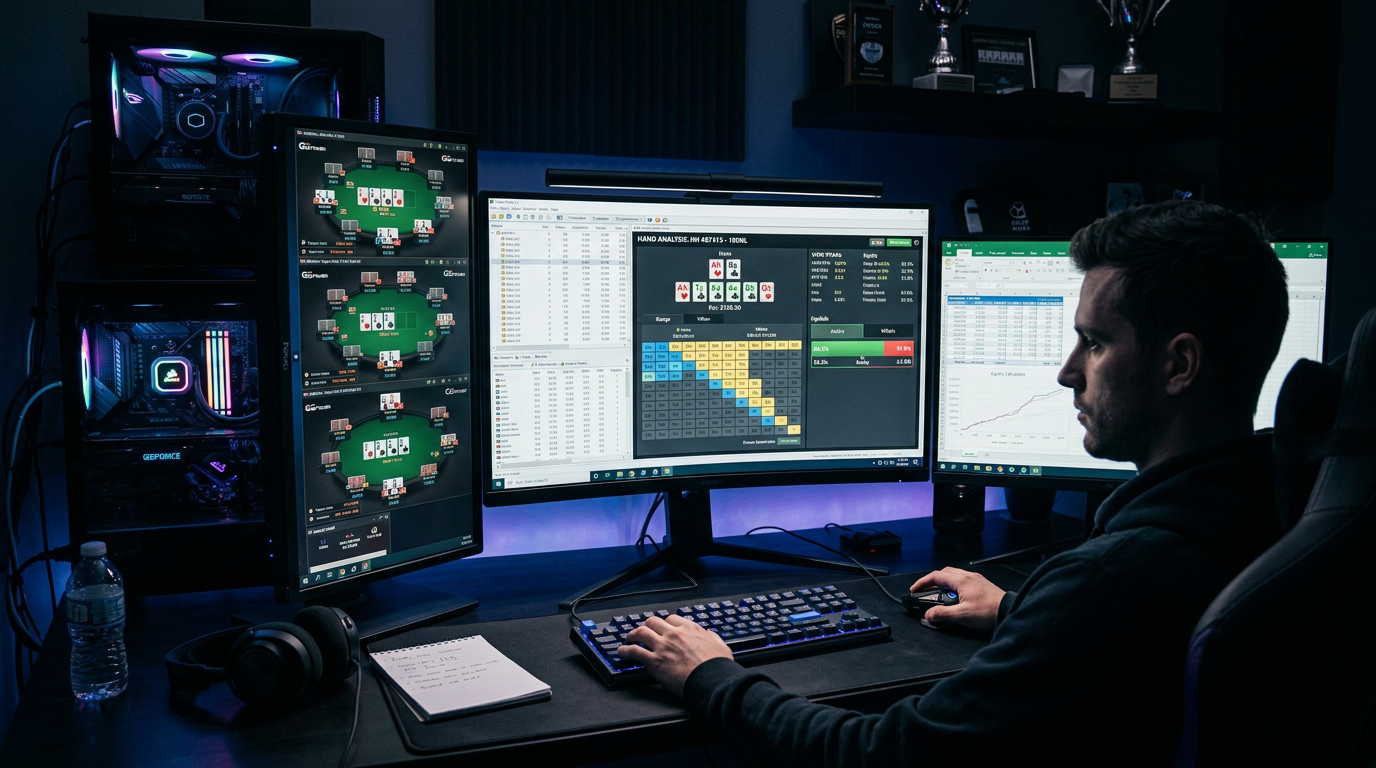
Best Poker Software for Windows 2026: The Real Grinder's Stack
I've watched Windows go from "the only platform poker software runs on" to "still the most flexible platform but no longer mandatory" over the past decade. In 2026, if you're running Windows, you have access to literally every poker tool ever made — including the legacy desktop solvers and old-school HUDs that never got Mac ports. That's a real advantage. The question is what you should actually run.
Most Windows-focused poker software guides treat the OS like a feature checklist. "Windows users can run X, Y, Z." That misses the point. What matters is which of the dozens of available Windows tools actually justify their place in your stack. Some classic Windows-only tools (PioSolver, the old Hold'em Manager versions, Equilab) are still relevant. Many aren't — they've been displaced by cross-platform browser tools that work better on Windows too.
This guide is the stack I'd actually build today if I were a Windows-native poker player at NL50–NL500. I'll cover HUDs, solvers, equity tools, training sites, range trainers, and the smaller categories. I'll tell you what to install on a fresh Windows 11 install, in what order, and how to configure it so you spend more time playing and less time fighting software.
I've grinded on Windows machines from 2017–2023, then switched to Mac primary, then maintained a dedicated Windows desktop for testing through 2025. My current setup runs both, with the Windows side as a backup and for the few tools I still test that have no good Mac alternative. The recommendations below are based on what I'd build today if Windows were my only option.
What Makes Windows Worth Choosing in 2026
Let me steelman Windows as the poker primary OS, because I've heard the "Mac vs Windows" debate become weirdly tribal.
Windows wins on:
Tool selection. Every poker tool ever made runs on Windows. Some classic Windows-only tools have no Mac alternative even via wrappers (DriveHUD for example). If you want maximum optionality, Windows.
Hardware flexibility. A self-built Windows desktop with a high-refresh monitor and a decent GPU costs less than a comparable Mac and lets you customize. For dedicated poker stations, Windows desktops have always been the cheaper path.
Multi-tabling at scale. Windows handles 12+ tables better than Mac in my experience. Some of this is window management, some is the maturity of poker site clients on Windows. If you're a 16-tabling Spin & Go grinder, Windows is the better OS.
HUD compatibility. Every HUD has a Windows version. Not all have a Mac version. PokerTracker and Hold'em Manager work on both, but DriveHUD, Hand2Note, and a handful of niche tools are Windows-only.
Mac wins on:
Battery life and travel. Self-explanatory.
Quietness and form factor. No fan noise during sessions matters to some players.
Cleaner OS upkeep. macOS requires less maintenance than Windows in my experience.
If you're choosing fresh today, choose based on lifestyle. If you grind from a desk with multiple monitors and play many tables, Windows. If you travel or grind from a couch with a single screen, Mac. Both are fine in 2026.
The Recommended Windows Stack
Before going through categories in detail, here's the stack I'd build on a fresh Windows install:
- PokerTracker 4 ($99.99 one-time) or Hold'em Manager 3 ($99 one-time) for HUD and database
- GTO Lab (~$49/month) or GTO Wizard ($49–$99/month) for solver work
- Equilab (free) for equity calculations
- Native poker site clients for the rooms you play
- Optional: DriveHUD 2 ($99/year) if you play Bovada/Ignition
- Optional: training site subscription for first 6–12 months
Total first-year cost for a typical setup: $500–$700. Annual ongoing: $300–$1100 depending on what you keep. Not cheap, but justifiable for any serious player.
Now the detail.
HUDs and Tracking Software on Windows
This is where Windows users have the most options and the most decision fatigue. Three major products plus a handful of credible alternatives.
PokerTracker 4 — $99.99 one-time. My pick for most players. Best-in-class database analysis tools. Filter system that lets you slice your data in essentially any way you can think of. Native Windows client (and Mac, but we're focused on Windows here). Stable on large databases — I've run 4M+ hand databases without performance issues.
The HUD itself is good after customization. The default config is too cluttered to use as-is; plan to spend 60–90 minutes building a layout that actually works for you. The hand replayer is functional but not as polished as HM3's. The note-taking is basic.
PT4 is the right pick if you prioritize database depth over in-game polish, plan to do meaningful post-session analysis, and want a one-time payment with no subscription. The cost amortizes over years of use.
Hold'em Manager 3 — $99 one-time. The polished alternative. Modern interface, excellent in-game HUD out of the box (still benefits from customization but the defaults are usable), the best hand replayer in the category, and NoteTracker — a structured note-taking system that's the killer feature for any player who plays the same opponents repeatedly.
Database analysis isn't quite as deep as PT4's but it's still strong. Custom report building is slightly clunkier. For most players this difference doesn't matter; for power users it does.
HM3 is the right pick if in-game HUD polish matters to you, you play against regular opponents you want to profile carefully, and you find PT4's interface dated.
Honest take: I've used both extensively. The choice between them is more aesthetic than functional for most players. Both are excellent. Neither is wrong.
DriveHUD 2 — $99/year. The Bovada/Ignition specialist. The only HUD that works on the Bovada network because of how the site handles hand histories (or rather, doesn't). If you play on Bovada, you have no real alternative. If you don't play on Bovada, ignore this product.
The annual subscription model is worse value than PT4/HM3's one-time pricing if you're going to use it for multiple years. But for Bovada players, the network coverage is the only thing that matters.
Hand2Note — Subscription tier (varies). Russian-origin HUD that's grown internationally. Range Research feature lets you see how an opponent has played similar spots in the past — genuinely innovative and not available in PT4 or HM3. Steeper learning curve. Worth a look for advanced cash regs who play against the same opponent pool repeatedly.
For most Windows users in 2026, the answer is PT4 or HM3 based on personal preference. Bovada players add DriveHUD. Power users may add or substitute Hand2Note.
Solvers on Windows
Windows users have access to every solver category — browser-based modern tools, classic Windows desktop solvers, and open-source options.
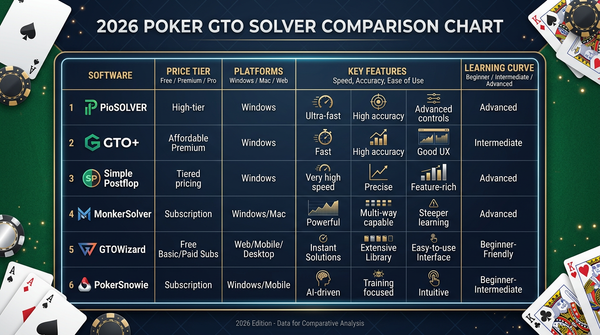
GTO Lab — ~$49/month or $399/year. Browser-based, beginner-friendly interface, comprehensive cash game library, integrated trainer. Same experience as on Mac. My current daily driver.
GTO Wizard — $49–$99/month. Browser-based. The market leader in pre-solved coverage across cash, MTT, spin & gos, and other formats. The trainer is the best in the industry. More expensive than GTO Lab but earns its price for serious multi-format players.
InstaGTO — ~$29/month. Budget option. Browser-based. Cash-focused with thinner coverage than GTO Lab. Good entry point for low-stakes players on tight budgets.
PokerSnowie — $29/month. Neural network approximation, not a true solver. Most beginner-friendly interface in the solver category. Outgrown after 3–6 months once you can read solver outputs directly. Still useful for the first few months of GTO study.
PioSolver — $200+ one-time desktop solver. The classic. Windows native, requires a beefy machine to run sims in reasonable time, but powerful for advanced custom work. Node locking, population studies, deep tree analysis — Pio remains best-in-class for these use cases. Steep learning curve. Still relevant in 2026 for advanced players who've outgrown browser-based options.
Simple Postflop — $200+ one-time. Similar to Pio. Niche but capable. Smaller user base.
Open-source (TexasSolver et al.) — Free. Steep learning curve, requires building trees yourself. Suitable for software engineers who enjoy tinkering with the math. Most poker players are better served by paid options.
For most Windows-using cash regulars, GTO Lab is the right starting point. If you play multiple formats or higher stakes, GTO Wizard premium tier. If you outgrow browser solvers and need advanced custom work, add PioSolver as a second tool — don't replace your browser solver, supplement it.
Equity Calculators
Equilab — Free. Windows-native, ancient, perfect at what it does. Calculate equity between hand ranges on any board. The interface is dated; the functionality is exactly right. Years of users haven't found a reason to switch en masse, which tells you something.
Flopzilla — $25 one-time. Adds range-vs-range visualization on flop textures. More polished than Equilab, similar core function. Worth the $25 if you spend a lot of time on flop equity analysis.
PokerCruncher — Available on Windows. Mac-first product but has a Windows version. ~$20–$30 one-time. Cleaner UI than Equilab. Nice if aesthetics matter.
For free, Equilab. If you'll pay $25, Flopzilla. Both are fine choices; this is a category where the value of upgrading is small.
Training Sites
The pre-solver-era kings. Still relevant for foundational learning but no longer the primary improvement vehicle for serious players.
Upswing Poker — subscription with course-style content. Doug Polk's headline content is excellent; lower-tier content is mixed quality. The "Lab" courses on specific topics are good purchases. Better for tournaments than cash, broadly speaking.
Run It Once — pro content from various players. Quality varies by instructor. Good for studying specific pro game styles.
Raise Your Edge — tournament-focused. The standard for serious MTT study.
Poker Academy — broad-spectrum training site combining videos and solver-driven content. Hybrid approach is appealing.
Honest take: for the first 6–12 months of serious study, a training site subscription provides high-value foundational content. After that, the per-hour value drops as you've absorbed the basics. Most players should plan to drop their training site subscription after a year and reinvest the budget in a better solver subscription.
Range Trainers
Mostly subsumed by solver trainer modes. The trainer in GTO Lab and GTO Wizard handles preflop range drilling, postflop spot drilling, and accuracy tracking. Standalone range trainers are less necessary than they were five years ago.
If you don't have a solver subscription yet, free range chart apps and pure memorization of published charts works equally well. Don't overspend on this category.
Specialty Tools
A few categories that don't fit elsewhere.
Table organizers / multi-tabling tools (Stack & Tile, TableNinja, etc.) — Windows-native utilities for arranging tables on screen, hotkeys for common actions, batch sit-out controls. Useful for high-volume grinders (8+ tables). Most cost $50–$100 one-time. Skip until you're regularly multi-tabling at volume.
Note-taking apps for poker — Some players use Notion, OneNote, or dedicated apps to maintain study notes and opponent profiles. HM3's NoteTracker handles this for in-game notes. For broader study journals, any general-purpose note app works.
Bankroll trackers — PT4 and HM3 handle this within their database. Standalone apps exist but aren't necessary.
Tilt protection / session limit tools — Niche but worth knowing about for players with self-control issues.
Comparison Tables
| HUD | Price (2026) | Strength | Best for |
|---|---|---|---|
| PokerTracker 4 | $99.99 once | Database depth | Long-term database analysis |
| Hold'em Manager 3 | $99 once | In-game polish, NoteTracker | Players who value HUD aesthetics |
| DriveHUD 2 | $99/year | Bovada compatibility | Bovada/Ignition players |
| Hand2Note | Subscription | Range research | Advanced cash regs |
| Solver | Price (2026) | Best for |
|---|---|---|
| GTO Lab | ~$49/mo, $399/yr | Cash regs, browser-based |
| GTO Wizard | $49–$99/mo | Multi-format, advanced |
| InstaGTO | ~$29/mo | Budget cash players |
| PokerSnowie | $29/mo | Pure beginners |
| PioSolver | $200+ once | Advanced custom work |
| Player profile | Recommended Windows stack | First-year cost |
|---|---|---|
| Brand new beginner | Free HUD trial + free YouTube + Equilab | $0 |
| Building base (months 1–6) | PT4 ($99) + Upswing ($30/mo for 6 mo) | ~$280 |
| Low-stakes serious (NL25–NL100) | PT4 + GTO Lab | ~$520 |
| Mid-stakes regular (NL200–NL500) | PT4 + GTO Lab or GTO Wizard | $520–$1300 |
| Bovada player | PT4 doesn't help, use DriveHUD 2 + GTO Lab | ~$500 |
| Multi-format pro | PT4 + GTO Wizard premium + occasional coaching | $1500+ |
| Advanced custom solver work | Add PioSolver to existing stack | +$200 once |
A Day-One Setup Walkthrough
If you're setting up a fresh Windows machine for poker today, here's the order I'd install things.
Step 1: Operating system housekeeping. Clean Windows install, all updates applied, antivirus configured. Whitelist your poker-related folders to prevent your antivirus from quarantining HUD scanner activity.
Step 2: Install your poker site clients. Get the actual poker rooms you play on installed first. Configure hand history saving in each one (this is critical for HUDs — many players forget this step and wonder why their HUD shows no stats).
Step 3: Install your HUD. PT4 or HM3 from the official site. Run through the install wizard. Choose PostgreSQL as your database (don't use SQLite for serious volume). Enter your license key. Configure auto-import for each poker site. Verify auto-import works by playing a single hand and checking it appears in the database.
Step 4: Customize your HUD layout. This is the step most players skip. The default HUDs that ship with PT4 and HM3 are too cluttered to be useful at the table. Spend 60–90 minutes building a layout that shows you the 5–7 stats you actually use, with color coding for player type identification. Build a separate popup for deeper drilling.
Step 5: Sign up for a solver. GTO Lab trial is the easy starting point. Browser-based, no install. Spend the first day of your trial just clicking around — don't try to learn anything specific.
Step 6: Install equity calculator. Equilab from the official site. Free, takes 30 seconds.
Step 7: Optional training site. If you're a beginner, sign up for one training site for at least three months. Skip if you're an experienced player.
Step 8: Configure backups. This is the step nobody does that everyone regrets. Set up automated daily backups of your HUD database to an external drive or cloud folder. Database corruption happens; backups are the difference between annoying and catastrophic.
Step 9: First session sanity check. Before you grind for real money, play one practice session and verify everything works end-to-end. HUD overlays appear. Stats update in real time. Hand history files are being saved by the poker client and imported by the HUD. Solver opens in browser without issues.
Step 10: Start playing. Your stack is now functional. The hard part — actually using these tools to study — starts now.
This whole process takes about 4–6 hours including the customization step. Block out a Saturday and do it properly once.
Things I Wish I'd Known About Windows Poker Setup
A few specific lessons from years on Windows.
Antivirus is the #1 source of HUD problems. Windows Defender and third-party antiviruses regularly flag HUD scanner behavior as suspicious. Whitelist your HUD's folder before you install. If something stops working mysteriously, check the antivirus quarantine first.
Multiple monitors transform multi-tabling. A single 27" monitor handles 4 tables comfortably. Two 27" monitors handle 8. If you're scaling volume, this is the cheapest performance improvement available.
SSD matters for database performance. Old spinning disks make HUDs feel sluggish. Any modern SSD is fine; even a cheap NVMe makes PT4 and HM3 feel snappy.
Run a separate user account for poker. This is paranoia-tier but worth considering. A dedicated Windows user account isolates your poker software from other browser activity and reduces the chance of accidentally clicking phishing links from poker emails on the same session as your real money clients.
Power settings. Disable sleep during sessions. Configure Windows to keep the network active during long sessions. The default power management can disconnect you from poker sites mid-hand if you let the system idle.
Update during off-hours. Windows Update is famous for restarting your machine at the worst time. Configure active hours and update windows so it doesn't kick you out of a session.
Learn one HUD deeply. Don't switch between PT4 and HM3 every six months. Pick one, spend a year mastering its filter system and customization, and reap the compounding benefits.
Common Issues and Their Fixes
HUD not appearing on tables: Verify auto-import is on. Verify hand history saving is enabled in your poker client. Whitelist HUD in antivirus. Restart both poker client and HUD.
Stats not updating in real time: Auto-import setting. Hand history file path. Permissions on the hand history folder. Test with a single hand.
Database performance degrading over time: Run database optimization. Schedule it monthly for active databases. Consider archiving very old hands to a separate database.
Solver loading slowly in browser: Modern browsers handle this fine but old Chrome or Edge versions can struggle. Update your browser. Hardware acceleration enabled.
Multi-tabling causing lag: RAM is the usual culprit. PT4 + 6 tables + browser solver = around 6-8GB of RAM use. 16GB is comfortable, 8GB is borderline.
HUD overlays drifting on table: Resize tables to a standard size. PT4 and HM3 save HUD positions per table dimensions; consistent sizing prevents drift.
Notes losing during update: Always back up before HUD version updates. Catastrophic note loss has happened in the past with major version updates.
What I'd Buy Today on Windows
If I were starting fresh on Windows in 2026, my exact buy list:
- PokerTracker 4: $99.99 once
- GTO Lab: $399/year
- Equilab: free
- Native poker site clients: free
- Tendler's mental game books: $40 once
Year one cost: ~$540. Annual ongoing: $399.
Optional add-ons I'd consider after 6–12 months:
- Training site subscription for foundational learning (first year only, $360/yr)
- One coaching session per quarter as I identify specific blind spots ($200–$300/quarter)
- PioSolver if I outgrow GTO Lab's pre-solved library ($200 once, year 2+)
The total budget for a serious low-stakes Windows player should sit between $500 and $1500 per year. Higher than that means you're probably overspending on tools relative to study time.
The Verdict
Windows in 2026 is the most flexible poker platform available. Every tool that exists runs on Windows, including the legacy desktop solvers and Bovada-only HUDs that don't have Mac equivalents. If maximum optionality matters to you, Windows is the answer.
The recommended stack for most Windows users:
- HUD: PokerTracker 4 or Hold'em Manager 3 — pick one, commit, customize properly.
- Solver: GTO Lab for cash specialists, GTO Wizard for multi-format players.
- Equity: Equilab — free, perfect at what it does.
- Optional: DriveHUD 2 for Bovada players, PioSolver for advanced custom work.
This isn't a fancy stack. It's not a comprehensive feature audit. It's what a serious player at NL50–NL500 would actually buy and use today.
The biggest mistake Windows poker players make isn't picking the wrong tools. It's owning too many. A focused stack used deeply outperforms a sprawling stack used shallowly. Pick four to five tools, commit to them for at least a year, and resist the urge to add more until you've truly outgrown what you have.
The Windows advantage is having more options. The Windows discipline is choosing not to use most of them.
Get the stack installed this weekend. Run a full sanity check. Play your first session with the new setup. From there, the work isn't about software — it's about showing up to study consistently for the next six months. The tools are the easy part.
A Week in My Windows Study Routine
When I'm grinding from my Windows desktop (which I still do for testing and for the few Windows-only tools I evaluate), the weekly rhythm looks roughly like this. I'll walk through what was on my calendar last week as a representative sample.
Monday. Open PT4 first thing. Filter for Sunday's session, sort by EV-loss-on-river. Eight hands stand out. Three are river bet-call situations on dynamic boards where I called and lost. The pattern is real. Open GTO Lab in a Chrome tab on my second monitor. Spend 50 minutes on BB defending vs CO single-raise pots, specifically river decision trees on flush-completing turns. Identified a spot where I'm calling rivers about 5% too often vs the solver. Documented in OneNote.
Tuesday morning. 15-minute trainer session before sitting down to play. Random spots, no theme. Scored 78%. Worst category was 4-bet pot postflop play. Not surprising — these are rare and I underbluff turn barrels in 4-bet pots.
Wednesday. 45 minutes on comparative study. Picked 4-bet pot scenarios across five different flop textures: A72r, KQ7tt, T93r, 994r, 765tt. Pattern: in 4-bet pots, the IP player should be barrelling turn at meaningfully higher frequencies than I'd been doing on the high-card boards (A-high and K-high). Logged it.
Thursday. 12-minute trainer session focused only on 4-bet pots. Accuracy on this subset jumped from 64% to 81% by the end. Reps work even on rare spots.
Friday. Full hand history review session, 70 minutes. Pulled five hands from the week. Three were river bet-call decisions (the original Monday topic), two were 4-bet pot turn decisions (the Wednesday topic). Ran each through GTO Lab. Total EV gap: about 7.2bb. At NL500 that's $36 of weekly leak directly identified.
Saturday and Sunday. Played. No structured study. The hands feed Monday.
Total weekly study: roughly 3 hours 20 minutes. Half of it is solver work, a quarter is trainer reps, a quarter is hand history confirmation. The Windows side adds: easy access to PioSolver if I want to spot-check any unusual scenario the browser solver doesn't quite cover (rare these days), better multi-monitor management for spreading study tabs, and faster file system performance for large database operations.
The Spots Where Windows Actually Matters Most
A more honest list of where the Windows platform genuinely matters for serious poker work, beyond the surface-level "more tools available" answer.
Multi-tabling at scale. Past 8 tables, Windows handles multi-tabling more gracefully than Mac. Some of this is window management primitives, some is poker site client maturity on Windows. If you're a 12+ tabling Spin & Go grinder, Windows is the right OS. Period.
PioSolver for advanced custom work. If you've outgrown browser solvers and need true desktop-class custom solving — node locking, population studies, deep tree analysis with non-standard sizings — PioSolver is the answer and it's Windows-only. This is a small minority of players but the few who need it really need it.
DriveHUD for Bovada/Ignition. If you play on the Bovada network, you need DriveHUD, and DriveHUD is Windows-only. There's no Mac path that doesn't involve running a Windows VM. For Bovada players, Windows native is the obvious choice.
Hand2Note range research. Hand2Note's "Range Research" feature — looking at how a specific opponent has played similar spots historically — has no real Mac equivalent. For high-volume cash regs who play against the same opponent pool repeatedly, this is genuinely valuable.
Self-built hardware budgets. A self-built Windows desktop with a 32" 4K monitor, fast SSD, and 32GB RAM costs less than a comparable Apple Silicon setup. If you're building a dedicated poker station and don't need portability, Windows is the cheaper path to high-end specs.
Legacy software compatibility. Old Windows poker tools still run on modern Windows. Old Mac poker tools sometimes don't run on Apple Silicon (Intel-only apps without Rosetta paths). If you have legacy notes systems, custom scripts, or ancient HUD bottles you depend on, Windows is the safer long-term bet.
These six categories are the real Windows advantages. Outside them, Mac is competitive or better. Choose based on which categories actually apply to your situation.
What I'd Tell Someone Buying Their First Windows Poker Setup
If you're building a fresh Windows machine for serious grinding and asked me what to actually buy, this is the unfiltered version.
Don't cheap out on the monitor. A 27" 1440p IPS panel is the minimum for comfortable grinding. A 32" 4K is the next big upgrade. The screen is where you spend hundreds of hours. Spending $400 vs $200 on a monitor is one of the highest-ROI choices in the whole budget.
Get an SSD, ideally NVMe. Spinning disks make PT4 and HM3 feel sluggish on large databases. Even a cheap NVMe makes everything feel snappy. Don't run poker software off old hard drives in 2026.
16GB RAM minimum, 32GB if you multi-table heavily. PT4 + HM3 + multiple browser tabs + poker client + HUD scanning = around 8–12GB during a session. 16GB is comfortable for 4–6 tables. 32GB lets you spread to 12+ tables without paging.
Whitelist your HUD folder before you install. Windows Defender and most third-party antiviruses regularly flag HUD scanner behavior as suspicious. Add the HUD folder to the antivirus exclusions before installation. Saves hours of debugging later.
Don't bother with Linux. I've seen people ask about Linux for poker. The answer is no. Wine compatibility is worse than CrossOver on Mac, no major poker site supports Linux clients officially, and HUD vendor support is minimal. Stay on Windows or Mac.
Plan for Windows Update disruption. Configure active hours so updates don't restart your machine mid-session. Schedule updates for off-hours. The default behavior will eventually kick you out of a tournament at the worst possible time.
Backup your HUD database weekly. Database corruption is real and devastating. Weekly automated backup to an external drive or cloud sync is the difference between annoying and catastrophic. Set this up before you have hands worth losing.
Don't buy multiple HUDs to "compare." Pick PT4 or HM3, commit, master one. Switching costs are real. The marginal differences don't justify maintaining both.
Six Months Later: Has the Windows Story Changed?
I wrote a version of this guide six months ago and the Windows story is broadly stable. A few specifics have shifted.
Browser solver maturity reduced the Windows advantage. Six months ago I'd have argued Windows was meaningfully ahead for solver work because PioSolver was still genuinely useful for many study sessions. Now GTO Lab and GTO Wizard cover most of what most players need. Windows-only solvers are increasingly a niche advantage rather than a primary one.
HM3's Mac wrapper experience improved enough that some former Windows-only HM3 users have migrated. This narrows Windows' historical HUD lead. PT4's Mac native version has always been good; HM3 catching up means fewer reasons to choose Windows specifically for the HUD.
Bovada/Ignition is still the strongest Windows-only argument. No change here. If you play on Bovada, you need DriveHUD, and DriveHUD is Windows. This single fact keeps a meaningful chunk of the player base on Windows.
Multi-tabling at extreme volumes still favors Windows. Mac has improved but the gap above 10 tables is real. For high-volume Spin & Go and MTT grinders, Windows remains the better platform. Cash players at 4–6 tables have less reason to prefer Windows than they used to.
Power user customization on Windows is still better. Custom hotkey software, table organizers, and the broader Windows utility ecosystem give Windows a long tail advantage for players who want to fine-tune every aspect of their grinding workflow. Mac users have less customization optionality.
The summary at six months: Windows is still the most flexible poker platform, but the gap is narrower than it was. Mac is now genuinely competitive for the typical low-to-mid-stakes cash reg playing 4–8 tables. Windows still wins for high-volume multi-tablers, Bovada players, advanced custom solver users, and players who need maximum tool optionality. Pick the platform that matches your actual situation, not the one that wins on a feature checklist.