Best Poker Solver Comparison 2026: Real Picks By Player Type
I've used GTO Lab, GTO Wizard, InstaGTO, PokerSnowie, and PIO recently. Here's the honest comparison with prices, trade-offs, and a clear pick by player type.
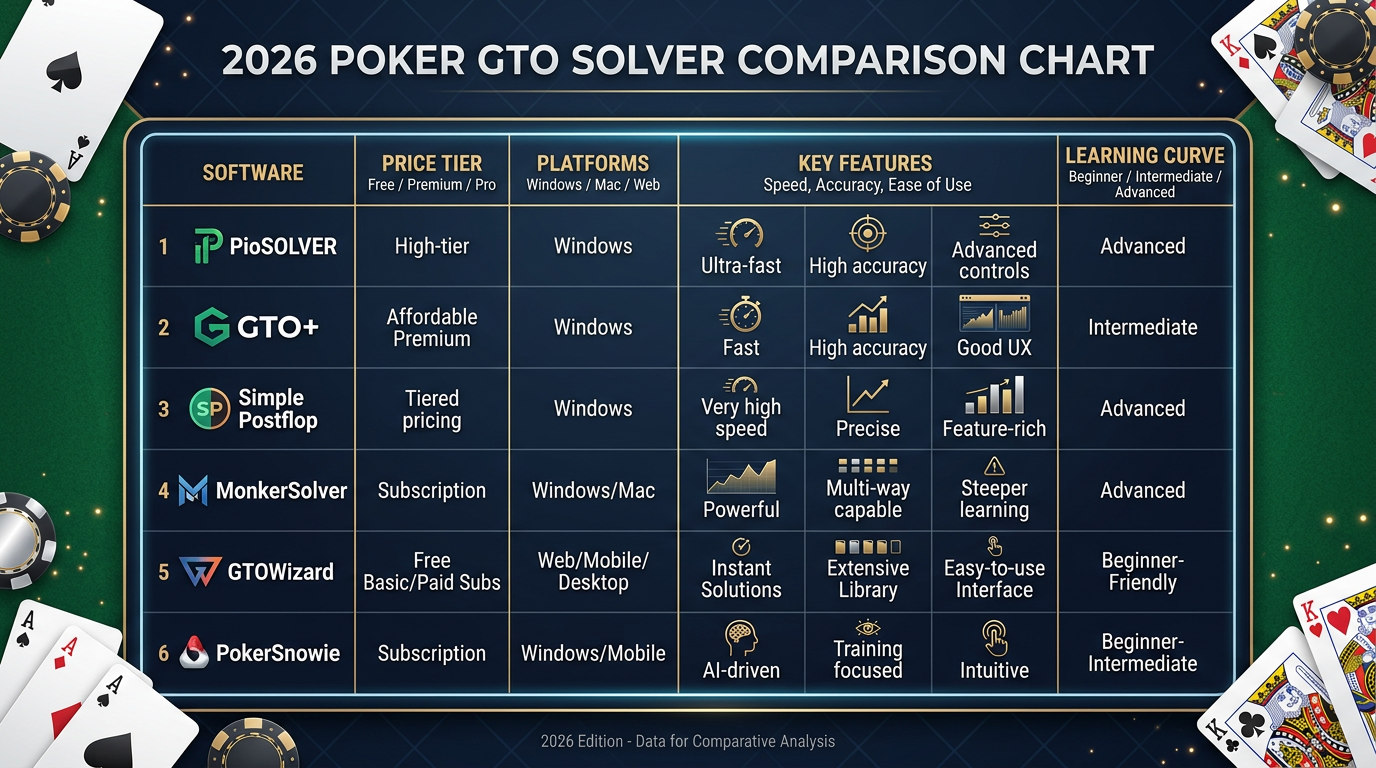
Best Poker Solver Comparison 2026: An Actual Working Recommendation
The number of times I've been asked "which solver should I buy" in the past year is somewhere north of 100. The frustrating thing is I can't give a single answer to that question. The right solver depends on your stakes, your game format, your platform, your study budget, and how much hardware you own. Anyone who tells you "X is the best solver" without asking those questions is doing you a disservice.
This article is my attempt to give you a real working recommendation by player type. I've used GTO Lab, GTO Wizard, InstaGTO, PokerSnowie, and PIOSolver all within the past 18 months. The opinions in this article are based on actual hours of use, not on marketing pages or YouTube reviews.
I'm Alex, 9-year online cash regular, currently grinding NL200-500 on the major Asian-facing networks. I write poker software reviews because I think the genre is mostly garbage and somebody should publish honest comparisons. Affiliate links throughout — they pay me a commission at no cost to you, and they don't change what I'd say if they didn't exist. Where I have negative things to say about products I'm being paid to refer, I say them.
The bottom-line answer up front: there is no single best solver. There are five real categories of player and each category has a different right answer. I'll walk through each.
What I Mean By "Solver"
I'm using "solver" loosely to mean "any tool that produces game-theoretically informed strategy advice." That technically includes:
- True solvers that compute equilibrium solutions for arbitrary game trees (PIOSolver, MonkerSolver)
- Pre-computed solver libraries that serve solutions from a precomputed database (GTO Lab, GTO Wizard)
- Cloud solvers that compute custom trees on remote hardware (InstaGTO)
- Neural network AIs that approximate strategy through self-play (PokerSnowie)
These are all different tools. They're often grouped together because they all answer "what's the right play here" but the underlying technology and the use cases differ. A meaningful comparison has to account for these differences.
The Five Tools In One Table
| Tool | Type | Annual Cost | Best For |
|---|---|---|---|
| GTO Lab | Pre-computed library | $179-$899 | Cash regs NL100+ wanting deep population tooling |
| GTO Wizard | Pre-computed library | $0-$1,188+ | Tournament players, mobile users, broad coverage |
| InstaGTO | Cloud solver | $179-$590 | Custom solves without buying hardware |
| PokerSnowie | Neural network AI | $290 | Beginners, conceptual training, real-time advice |
| PIOSolver | True solver (desktop) | $250-$1,099 (one-time) | Coaches, researchers, deep custom work |
I'm going to dig into each one briefly, then move into the player-type recommendations.
Quick Take On Each Tool
GTO Lab
A pre-computed library focused on cash games with the best population deviation tooling I've used. Standard plan at $399/year covers the cash content most regs need. Mobile experience is poor. Tournament coverage is secondary.
I'm currently subscribed at the Standard tier. It's my primary solver workspace. The Population Deviator is the feature that justifies the subscription for cash players — being able to lock opponent strategies to deviate from optimal in specific ways and see your exploitative response is half the value of solver work in 2026.
GTO Wizard
A broader pre-computed library with strong mobile and the deepest tournament coverage in the category. Has a real free tier. Starter at $588/year is more expensive than GTO Lab Standard but covers more games.
I used GTO Wizard from late 2022 through early 2025. Switched to GTO Lab when I realized I was paying for MTT coverage I never used. If I were a tournament player I'd still be on Wizard.
InstaGTO
A cloud-based custom solver. You define a tree, submit, and get a result in 30-180 seconds. No hardware requirements. Standard plan at $290/year.
I subscribe to fill the gap GTO Lab can't fill — when I encounter a spot that isn't in the pre-computed library, InstaGTO solves it on demand. It's specifically a custom-solving tool, not a study workspace.
PokerSnowie
A neural network AI trained through self-play. $290/year. The strategy isn't strictly GTO but it's strong, and the interactive trainer mode is the best in the category for pattern recognition.
I subscribe and use the Trainer most mornings for 30 minutes. Snowie is meaningfully better than GTO solvers for beginners learning fundamentals; for experienced players it's a useful complement to GTO study, not a replacement.
PIOSolver
The original commercial GTO solver. Runs on your local hardware. Requires significant RAM (32GB+) for serious trees. One-time license: $250 for Basic, $499 for Pro, $1,099 for Edge.
I owned PIO years ago. Don't currently. The reason is hardware — my current laptop has 16GB of RAM and PIO's serious work doesn't fit. If I had a desktop with 64GB I'd own PIO. The one-time cost beats subscription tools over a multi-year window if you have the hardware.
Comparison On Specific Capabilities
| Capability | GTO Lab | GTO Wizard | InstaGTO | PokerSnowie | PIOSolver |
|---|---|---|---|---|---|
| Pre-computed library | Strong cash | Strongest overall | None | N/A (different tool type) | None |
| Custom solving | Limited (Pro) | Limited (Pro) | Best in price class | None (it's an AI, not a solver) | Best in absolute terms |
| Mobile experience | Bad | Best | Web only, weak | Acceptable | Desktop only |
| Tournament coverage | Limited | Best | Limited | Limited | Possible with custom trees |
| Cash coverage | Excellent | Excellent | Custom only | Acceptable | Possible with custom trees |
| Population deviation | Best | Strong | Manual | None | Manual via node-locking |
| Training/quiz mode | Adaptive, good | Adaptive, less granular | None | Best in category | None |
| Hand history analyzer | Fast | Slower | Limited | Limited | None (primarily a solver) |
| Free tier | No (trials) | Yes (real) | No | 7-day trial | None |
| Hardware requirements | None (cloud) | None (cloud) | None (cloud) | Light | Heavy (32GB+ RAM) |
Pricing Across Currencies
For grinders outside the US, USD billing converts roughly:
| Tool | Standard Tier USD | CAD | AUD | NZD | GBP | EUR |
|---|---|---|---|---|---|---|
| GTO Lab Standard | $399 | $545 | $610 | $665 | £315 | €370 |
| GTO Wizard Starter | $588 | $800 | $900 | $980 | £465 | €545 |
| InstaGTO Standard | $290 | $395 | $445 | $485 | £230 | €270 |
| PokerSnowie Pro | $290 | $395 | $445 | $485 | £230 | €270 |
| PIOSolver Pro | $499 (one-time) | $680 | $765 | $835 | £395 | €465 |
That's the per-year comparison except for PIO which is one-time. PIO over a 3-year window costs about $166/year amortized; over a 5-year window about $100/year. The economics favor PIO if you're confident you'll use it for years and you have the hardware.
Recommendation By Player Type
This is the part that matters most. Five player profiles, each with a specific recommendation.
Profile 1: New Player, NL10-NL50, Limited Budget
You're new to poker theory, you're playing micro stakes, and you have maybe $300/year to spend on study tools.
Recommendation: PokerSnowie at $29/month or $290/year.
PokerSnowie is the most accessible serious-poker AI for beginners. The Trainer mode is more useful than GTO solvers at this stage because you're building intuition, not chasing precision. The advisor explains decisions in ways a developing player can absorb.
GTO Lab and GTO Wizard at this stage are overkill. You don't yet have the framework to extract value from solver outputs. Spend the year on PokerSnowie, develop fundamentals, and graduate to a GTO solver when you're playing NL100+.
GTO Wizard's free tier is also worth keeping installed. Cross-reference Snowie's recommendations against Wizard's free library when you want to verify a spot.
Profile 2: Cash Reg, NL100-NL500, Desktop-Heavy, Serious Study
You're a regular at meaningful stakes, you study consistently, you have a Windows or Mac desktop where most of your study happens.
Recommendation: GTO Lab Standard at $399/year, plus InstaGTO Standard at $290/year, total $689/year.
GTO Lab covers your study workspace needs — pre-computed library, drilling, hand analyzer, population deviation. InstaGTO fills the custom-solving gap when you encounter spots outside the library. The combination covers about 95% of what a serious cash player needs without paying for tournament coverage you don't use or premium tiers you don't need.
If you're cash-only and the budget is tight, you could skip InstaGTO and just run GTO Lab Standard. You'll occasionally hit spots that aren't in the library and be unable to solve them, but you can usually find a close-enough analog.
PokerSnowie is a useful add-on at $290/year if you have the budget — different perspective on strategy, useful for daily pattern recognition. Total stack at $979/year is a meaningful poker study budget.
Profile 3: Tournament Player
You play MTTs at any level — daily online, scheduled events, Spin & Gos.
Recommendation: GTO Wizard Starter at $588/year as the primary tool.
GTO Wizard's tournament coverage is the deepest in the category. ICM solutions, push-fold charts, MTT-specific situations across stack distributions. Nothing else matches this in the same price range.
The mobile app is the bonus — most tournament players have downtime during long sessions and the iOS app is good enough to study during breaks.
GTO Lab Pro at $899 also has MTT coverage but it's secondary in their product. For tournament players GTO Wizard is a clearer pick.
If you have additional budget, add InstaGTO at $290/year for tournament-specific custom solves (deep stacks at unusual ICM positions, etc.). Total at $878/year is reasonable.
Profile 4: Coach Or Researcher
You teach poker, you produce content, or you do deep research that requires custom trees with arbitrary configurations.
Recommendation: PIOSolver Pro ($499 one-time) plus InstaGTO Pro at $590/year for cloud overflow.
PIOSolver is the right local tool for deep custom work if you have the hardware (32GB+ RAM, ideally 64GB+). The flexibility for tree configuration and the ability to inspect intermediate solver state matters for coaching content and research.
InstaGTO Pro covers situations where you need solves quickly without waiting for PIO to compute, or when you're traveling without your main rig. The combination gives you the flexibility coaching work requires.
GTO Lab Standard at $399/year is also useful as a teaching reference — when you're building lesson plans you can grab pre-computed solutions instead of solving from scratch each time. Optional add-on.
Total stack: $499 one-time + $590-$989/year. Reasonable for a professional.
Profile 5: Mobile-First Studier, Any Stakes
You travel a lot, you don't have consistent desktop access, or you simply prefer to study on a phone or tablet.
Recommendation: GTO Wizard Starter at $588/year.
GTO Wizard's mobile app is the only credible solver experience on a phone in 2026. Trainer mode, library browsing, range explorer, hand replayer — all work well on mobile.
GTO Lab on mobile is bad enough that I can't recommend it for mobile-heavy users. PokerSnowie's mobile experience is acceptable but the interactive features that make Snowie valuable work better on desktop. InstaGTO's web interface technically loads on mobile but tree configuration is unusable.
If your study workflow lives on a phone or tablet, GTO Wizard wins by default. The price premium over GTO Lab is the cost of mobile capability, and for mobile-first users it's worth paying.
What About PLO Players?
None of the tools above are great for PLO. Quick takes:
- PLO Genius: The PLO-specific equivalent of GTO Lab. Pre-computed library focused on PLO. Worth subscribing to if you play PLO seriously.
- MonkerSolver: True PLO solver. Like PIO for PLO. Requires hardware and patience.
- GTO Wizard: Has some PLO content; coverage is improving but secondary.
- GTO Lab, InstaGTO, PokerSnowie: Limited or no PLO coverage.
If you're a serious PLO player, this article is incomplete for you. Look at PLO Genius and MonkerSolver as your primary options.
Critical Mistakes Players Make When Picking A Solver
I see these constantly. Don't do these.
Buying The Most Expensive Tool
The price tag does not predict the value. GTO Wizard Premium at $249/month is more expensive than GTO Lab Standard but isn't necessarily more useful for any specific player. Match the tool to your needs, not to your budget ceiling.
Picking Based On Coach Or Streamer Endorsements
A famous coach uses GTO Wizard because they have a sponsorship deal, or because they happened to start with that product, or because their content workflow benefits from a specific feature. The tool that's right for them isn't necessarily right for you.
Not Using The Free Tiers And Trials
GTO Wizard has a real free tier. PokerSnowie has a 7-day trial. GTO Lab and InstaGTO offer periodic trials. Use these before paying. Twenty hours in each free tier will tell you which interface fits how you think.
Buying A Tool And Not Using It
The most common mistake. Players subscribe to a solver, study for two weeks, lose enthusiasm, and let the subscription auto-renew for years without using it. Set a calendar reminder before each renewal. If you haven't used the tool in the past 30 days, cancel and re-subscribe later when you'll actually use it.
Trying To Replace Solver Work With Just Watching Videos
Poker Academy and similar video products are valuable, but they don't replace solver work. Concepts without practice don't stick. If you have to choose between video content and solver subscription, take the solver subscription — you can find video content for free if you look hard enough.
Buying Multiple Pre-Computed Libraries
Subscribing to both GTO Lab and GTO Wizard at the same time is mostly waste. They cover overlapping ground. Pick one, supplement with a custom-solving tool if needed (InstaGTO or PIO).
Not Pairing A Solver With A Tracker
A solver tells you what GTO does. Without a tracker or HM3, you don't know what YOU did. Solver work in a vacuum is unmoored from your actual play. Pair solver subscription with a tracker; the combination is what produces real win rate improvement.
My Personal Stack For Reference
So you can see where my recommendations come from, here's what I currently subscribe to:
- GTO Lab Standard: $399/year — primary solver workspace
- InstaGTO Standard: $290/year — custom solves on demand
- PokerSnowie Pro: $290/year — daily pattern recognition
- Hold'em Manager 3 Combo + Cloud Sync: $99 one-time + $59/year — tracker and HUD
- Poker Academy Access: $299/year — structured video content
Total annual recurring cost: roughly $1,337/year. That's a serious budget but I play stakes where it pays for itself many times over. For someone playing NL50, this stack is overkill — half this stack is enough.
Common Questions
How long does it take for a solver subscription to pay for itself? Depends on your stakes and how seriously you study. At NL100, a 1bb/100 win rate improvement over 100k hands is roughly $1,000. If solver study moves you 1bb/100 in six months, that's $1,000-$2,000 in EV. Most subscription tools cost $300-600/year. The math works at NL50 and above for serious students.
Should you wait for next year's tools? Probably not. The category is mature. Big new product launches are rare. Buy what works now and upgrade incrementally as your needs change.
Can you share solver subscriptions with a friend? No, all of them ban for shared accounts and most can detect concurrent logins from different IPs. Don't bother.
What about free solver tools? GTO Wizard's free tier is the main one. There are also some open-source projects (OpenSolver, etc.) but they require technical setup and don't have curated content. For beginners on zero budget, the GTO Wizard free tier is the realistic starting point.
Will solver use get you banned from poker sites? Solvers are study tools, not real-time assistants. You're not running them while you play. There's no realistic detection mechanism. The risk is zero. (HUDs are a different conversation — see my DriveHUD review for thoughts on what's safe.)
What about PIOSolver alternatives like MonkerSolver? MonkerSolver is the main alternative for true desktop solving. It's strong for PLO and for spots where PIO has limitations. For NLHE, PIO is the more common pick. Either works for serious custom solver work.
How do you keep solver work from being overwhelming? Limit your daily study to a fixed time block (45-90 minutes), pick one focus area per week, and resist the urge to chase every interesting tangent. Solver work is endless; your time isn't. Discipline more than tools.
Is there a "GTO Wizard for Mac" issue like there is with HM3? No. GTO Wizard is a web app and works fine on Mac. The Mac issues are specific to desktop tracker software, not solver tools.
Should you pay annually or monthly? Annual saves 15-25% across most tools. If you're confident you'll use a tool for the full year, pay annually. If you're not sure, pay monthly for the first three months and switch to annual if you're still using it.
What about the "AI poker assistant" tools that are advertised as solvers? Be very careful. Several products have launched in 2025-2026 marketed as "AI solvers" that are actually wrappers around real-time advice tools that violate poker site TOS. Stick with the tools above; they're legitimate study tools, not bots.
Verdict: Match The Tool To Your Game, Not The Hype
The right solver depends on your specific situation. There is no single best tool. The five-tool comparison I've laid out covers the realistic options for cash and tournament players in 2026.
If you read this article looking for one answer: for a typical English-speaking online poker player at NL100+ who plays cash on desktop, GTO Lab Standard at $399/year is the highest-value single subscription, and pairing it with InstaGTO Standard at $290/year covers the long tail of custom solves you'll need. Total $689/year for a study stack that competes with anything more expensive.
For tournament players, swap GTO Lab for GTO Wizard. For mobile-heavy users, swap GTO Lab for GTO Wizard. For beginners or budget-constrained players, start with PokerSnowie and add a tracker before you add a solver. For coaches, buy PIOSolver if you have the hardware and supplement with InstaGTO.
The worst decision you can make is to subscribe to the wrong tool because of marketing or peer pressure, then not use it because the workflow doesn't fit you. Take advantage of free tiers and trials. Spend a few hours in each candidate tool before committing. The right pick will be obvious within a week of real use.
Once you've picked, commit to the workflow for at least 90 days. Daily study, structured by focus area, with hand history review. Solvers don't improve win rates by sitting on your computer. They improve win rates when you use them consistently to identify and fix specific leaks. The tool is necessary but it's not sufficient. Your discipline is what does the work.
Extended Comparison: When Each Tool Wins A Specific Scenario
Beyond player profiles, there are specific scenarios where one tool clearly beats the others. Useful to know if you're trying to figure out which tool to reach for in a specific moment.
| Scenario | Best Tool | Why |
|---|---|---|
| "I need a GTO solution to a non-standard tree, right now" | InstaGTO | Custom solve in under 3 minutes |
| "I want to drill a specific cash spot for an hour" | GTO Lab | Adaptive trainer with cash-focused weighting |
| "I want to study during a 20-minute commute" | GTO Wizard | Real iOS app, full functionality on phone |
| "I want to verify a tournament push-fold decision" | GTO Wizard | Deepest tournament library |
| "I want to learn what a polarized vs merged sizing looks like" | PokerSnowie | Best beginner-friendly explanations |
| "I want to explore an exploitative deviation against population" | GTO Lab | Best Population Deviator interface |
| "I want to solve at extreme deep stacks (250bb+)" | PIOSolver | No tree size limits with adequate hardware |
| "I want to study without spending money this month" | GTO Wizard Free | Real free tier with meaningful coverage |
| "I want a daily 30-minute pattern recognition rep" | PokerSnowie | Best Trainer mode for repetition |
| "I want to coach students with shareable screenshots" | PIO or GTO Lab | Both produce clean, shareable output |
| "I want to research a specific sizing theory across many spots" | PIO or InstaGTO | Both let you iterate solves quickly |
| "I want to double-check Snowie's recommendation" | GTO Lab or InstaGTO | Either provides the GTO truth |
This table is closer to how I actually think about which tool to reach for in a specific moment. Player-profile recommendations matter for the initial purchase decision; scenario-specific recommendations matter for daily use within an established stack.
A Week In My Multi-Solver Routine
To make the multi-tool stack concrete, here's how three solvers fit together in my actual week.
Sunday is volume. No solver work.
Monday morning, GTO Lab heavy. Trainer for 45 minutes weighted to my current focus area. Then I open the analyzer and review 8-12 hands tagged from Sunday's sessions. Anything that needs a custom tree gets queued for InstaGTO. Anything that benefits from population deviation work gets explored in GTO Lab's Deviator. Total time: 90-120 minutes.
Monday afternoon, InstaGTO. Run the 4-6 custom solves queued from the morning review. Each takes 60-180 seconds; the review of each takes 5-10 minutes. Total time: 60-90 minutes.
Tuesday morning, PokerSnowie Trainer. 30 minutes of continuous-session pattern reps. No deep analysis, just throughput.
Tuesday evening, play 3-4 hours.
Wednesday morning, hand history work in HM3. Identify what to study. No solver use directly.
Wednesday afternoon, GTO Lab analyzer for any new spots flagged. About 60 minutes.
Thursday morning, PokerSnowie Trainer again. 30 minutes.
Thursday evening, play.
Friday morning, range work. Could be Snowie's range visualizer for fast drilling. Could be GTO Lab's range explorer for verification. Usually both, alternating between sessions. About 45 minutes.
Saturday and Sunday, volume. No study.
Total weekly study time across all tools: about 7-9 hours. Distributed across three tools because each does something different. The pattern: GTO Lab is the truth source, InstaGTO fills custom-solve gaps, PokerSnowie provides the daily reps.
For a player at lower stakes the same logic applies but at lower volumes. A NL50 player might do 4-5 hours of study per week split similarly. The proportions stay; the absolute hours scale.
Detailed Configuration Walkthroughs By Tool
Each tool requires different first-week setup work. Here's what to actually do.
GTO Lab first-week setup:
- Configure your preferred bet sizing schemes in user preferences (33%/75%/overbet for SRP, 33%/100% for 3bp, etc.)
- Pin your most-studied spot families to your dashboard
- Build 5-8 saved analyzer filters covering your most common review patterns
- Configure trainer focus areas for each leak you want to address
- Bookmark 10-15 reference solutions you reference frequently
GTO Wizard first-week setup:
- Install and sign into the iOS app, verify sync
- Configure preferred bet sizings
- Pin your most-studied games (cash, MTT, Spin) to home
- Set trainer focus areas
- Install browser extension if your tracker supports integration
- Bookmark frequent reference solutions
InstaGTO first-week setup:
- Run 4-6 starter solves to populate your library
- Tag each with descriptive labels (3bp_OOP_180bb, SRP_turn_disconnected, etc.)
- Save 2-3 templates representing your most common spot configurations
- Test the cloud connection during your normal study time
- Confirm your monthly solve quota is enough for your pace
PokerSnowie first-week setup:
- Run the Trainer for 30 minutes to calibrate the AI to your skill level
- Configure the advisor display (delayed feedback works best)
- Bookmark the range visualizer for your most-studied positions
- Skip the Coach modules initially; add later if you find you want structured content
- Decide whether you'll use the desktop app or the cloud version primarily
PIOSolver first-week setup (if you have it):
- Verify your hardware can handle the tree complexity you need
- Build 2-3 template trees you'll reuse
- Configure your preferred convergence settings (lower convergence = faster, less precise)
- Set up a directory structure for organizing solves
- Test export workflows for sharing solves with others
The setup time per tool varies — Snowie is 2-3 hours, GTO Lab is 3-5 hours, InstaGTO is 1-2 hours, PIO is 5-10 hours including hardware tuning. The setup investment pays off forever after, so don't skip it because it feels tedious.
What I'd Tell Someone Buying Their First Solver
Practical advice that's not on any marketing page.
Don't buy on a Sunday after losing. Tilt purchases are the worst purchases. If you find yourself deciding to buy a solver because "I need to fix my game," wait three days. The right purchase tomorrow is still right tomorrow; the wrong purchase tomorrow is still wrong tomorrow.
Use the free tier or trial first. GTO Wizard's free tier, PokerSnowie's 7-day trial, GTO Lab's periodic trials, InstaGTO's lowest tier. Spend 10-20 hours in each candidate before committing money. The right pick will be obvious from real use.
Don't buy two solvers in your first 6 months. Pick one, learn it well, identify what it doesn't cover, then add a second tool to fill that specific gap. Buying multiple tools simultaneously means you'll use neither well.
Pair the solver with a tracker before deepening solver investment. A solver without a tracker is unmoored from your actual play. If you don't already have HM3 or PT4 (or DriveHUD 2 as the budget option), get one before spending more on solver tooling.
Set a renewal calendar reminder. Most tools auto-renew. Calendar event 7 days before each renewal asks you "did I use this in the past 30 days?" If no, cancel and re-subscribe later when you'll use it.
Don't let perfect be the enemy of good. Players sometimes spend months researching the perfect solver setup and never start studying. Pick something reasonable, start using it, refine over time. The marginal improvement from picking the optimal tool is small; the marginal improvement from actually studying for a year is huge.
Six Months Into A Multi-Solver Stack: Honest Assessment
The stack I'm running — GTO Lab Standard + InstaGTO Standard + PokerSnowie Pro + HM3 + Poker Academy — costs about $1,337/year. That's a lot of money. It's also been the most productive study period of my career.
The reason it works isn't the absolute spend; it's the coverage. Each tool does something the others can't. GTO Lab is my workspace. InstaGTO fills the custom-solve gap. Snowie provides the daily reps. HM3 captures my play. Poker Academy provides the conceptual framing for things I can't extract from raw solver output.
Could I run a leaner stack? Yes. The minimum viable stack is one solver (GTO Lab or GTO Wizard) plus a tracker (HM3 or PT4). That's $498-687/year. It would cover 75-80% of what I do now.
The marginal value of the additional tools (InstaGTO, Snowie, Poker Academy) at my stakes pays for them. At lower stakes the same additions might not pay for themselves and you'd be better off running the lean stack.
The honest assessment: there is no single best solver. The right stack depends on your stakes, your game profile, your platform, your study habits, and your budget. The five tools I covered in this article cover the realistic options for English-speaking players in 2026. The recommendations by player profile are how I'd actually advise friends asking me this question. Pick what fits your situation, commit to using it, and put in the hours. The hours matter more than the tools.