DriveHUD 2 Review 2026: Fast HUD, Real Trade-offs
I've used DriveHUD 2 across three networks for 8 months. Honest take on the 15-minute setup, the limited filter depth, and whether the $99/year sub is right for you.
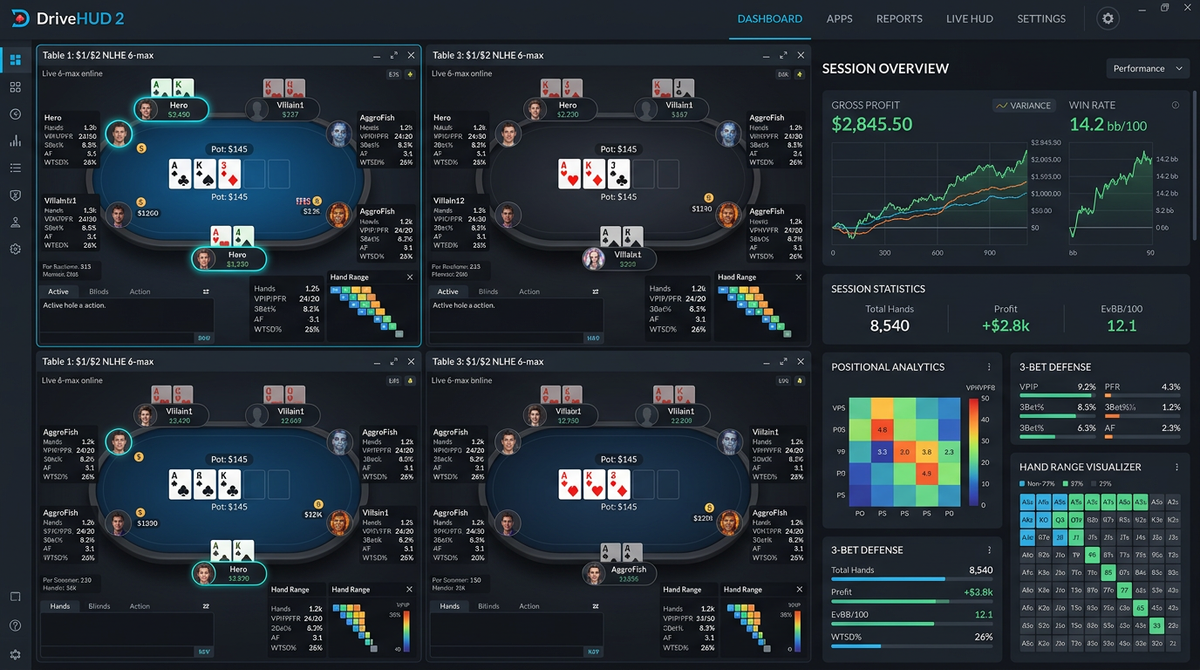
DriveHUD 2 Review 2026: The Tracker That Respects Your Setup Time
I want to start with a story that explains the entire value proposition of DriveHUD 2.
A friend of mine — call him David — got into poker seriously about a year ago. He plays NL25-50 on a US-facing network, has a day job, and gets maybe 3-4 hours of poker time a day on weeknights. Last September he asked me which tracker to buy. I gave him my standard advice: install PokerTracker 4, spend an evening configuring the HUD, learn the filters, settle in.
Two weeks later he texted me to say he'd been "configuring PT4 for 12 hours" and still hadn't played a single hand with the HUD live. He wasn't being dramatic. PT4's onboarding for a player without any tracker experience is genuinely a slog. He bought DriveHUD 2 the next day and was running a tuned HUD on his actual tables in under 30 minutes.
That's DriveHUD's whole pitch. It's the tracker for players who want a HUD without the homework. It costs more than PT4 over time because it's subscription-based, it has weaker analysis tools, and the filter system tops out earlier — but if you don't need the deep stuff, none of those trade-offs hurt you, and you save yourself a weekend of configuration pain.
I'm Alex, a 6-max NL cash reg, nine years online, currently grinding NL200-500. I run HM3 as my primary tracker on my main grinding setup. I've also kept DriveHUD 2 installed on a secondary laptop for the past 8 months specifically so I can speak to it accurately. The links here are affiliate links and I only recommend products I think are worth their money.
This review is going to be more critical than some you'll read. DriveHUD has real strengths and real limitations and I'm going to call both out without trying to manufacture a narrative.
What DriveHUD 2 Is And Who Built It
DriveHUD 2 is a hand history database with a HUD, a hand replayer, a leak detector, and a small set of analysis tools. It launched in 2014 and has been actively developed since. The company is smaller than PokerTracker or Hold'em Manager, and the product reflects that — it does fewer things, but the things it does are tightly designed.
The product's identity is built around three explicit choices the developers have made:
- Pre-configured HUDs that work out of the box instead of forcing you to build your own
- A subscription pricing model instead of one-time purchase
- Native support for poker rooms that block other trackers, especially WPN and Bovada/Ignition
That third point is genuinely important and underdiscussed. If you play on Bovada or Ignition, your hand history situation is different from PokerStars or GG — those rooms don't write hand histories to your local machine in the same way. DriveHUD has a workaround that scrapes from the table client and reconstructs hand histories. That's the reason a lot of US-facing players use DriveHUD specifically — it works where the others don't.
I want to be honest about something here: that scraping mechanism is a fragile feature and it has been broken at various points historically when the poker clients update. If you're on Bovada/Ignition and DriveHUD breaks, your tracker is dead until they patch. As of writing in May 2026 it's working, but I've seen reports of multi-week outages in the past two years. Worth knowing.
Pricing: The Subscription Model
DriveHUD changed to a subscription model a few years ago. Current pricing as of 2026:
| Tier | Price | What's Included |
|---|---|---|
| DriveHUD 2 Standard | $99/year | All games, full HUD, full database, all supported sites |
| DriveHUD 2 Lifetime | $349 one-time | Same features, perpetual license, lifetime updates |
| Free Trial | Free 30 days | Full access, no credit card required |
The 30-day free trial is genuinely useful. You can install DriveHUD 2 and use it without payment for a month, which is enough to know if it works on your sites and fits your workflow.
The Standard subscription at $99/year is the default option most players take. It works out to about $8.25/month, which is reasonable for a tracker that includes a HUD and an analysis engine. The Lifetime license at $349 makes sense if you've decided you'll be using DriveHUD for 4+ years; it pays for itself at year four.
In CAD/AUD/NZD/GBP/EUR (USD billing):
- Standard: ~$135 CAD / $152 AUD / $167 NZD / £79 GBP / €92 EUR per year
- Lifetime: ~$475 CAD / $535 AUD / $585 NZD / £276 GBP / €322 EUR one-time
Compared to PT4's $99 one-time fee or HM3's $99 + $59/year sync model, DriveHUD's economics depend on your time horizon. Two years in you've spent roughly the same as a PT4 license. Five years in you've spent five times what PT4 cost. If long-term cost matters to you, this is a real consideration.
That said, for a serious player the cost difference between $99 over five years and $495 over five years is roughly $80/year — a tiny fraction of any reasonable winrate at NL50 and above. The cost shouldn't be the deciding factor for anyone making real money playing.
Where DriveHUD 2 Wins
Let me be specific about what DriveHUD does well.
Setup Speed Is Genuinely Best-In-Class
This is the headline feature and it's real. From a fresh install to a working HUD on live tables, my fastest time was 18 minutes. My typical time including HUD tuning is around 30-45 minutes. Compare that to 60-120 minutes for HM3 and 90-180 minutes for PT4.
The reason DriveHUD onboards faster is the pre-configured HUDs. You install, pick a HUD layout from the templates (there are five default templates ranging from "minimal" to "comprehensive"), point it at your hand history folder, and play. You can customize from there at your leisure. The default templates are competent enough to use without modification.
For a player who values their time over their long-term tooling depth, this matters a lot.
Bovada/Ignition Support
If you play on Bovada or Ignition (the same poker room operating under different brands), DriveHUD is essentially the only credible option. PT4 and HM3 either don't support these rooms or have major limitations. DriveHUD's scraping mechanism rebuilds hand histories from the table client and lets you run a HUD that works.
The scraping isn't perfect — it can occasionally miss hands, especially at high table counts — but it's the best available solution for these networks. I know multiple regs who switched to DriveHUD purely because they wanted to play Bovada with a HUD.
The Default HUD Looks Good
This sounds superficial but it isn't. DriveHUD's HUDs have clean modern visuals — proper antialiasing, sensible color choices, readable fonts at typical zoom levels. PT4's HUD looks dated by comparison. HM3's HUD is comparable but you have to configure it more.
For a player who multi-tables 6-9 tables on a 4K monitor, visual quality of the HUD overlay actually affects fatigue. Cleaner overlays mean less cognitive load. This is the kind of thing you only notice if you've sat through long sessions; once you do, you don't want to go back.
The Leak Detector Is Useful For New Players
DriveHUD's built-in leak detector is one of the more useful features for players still figuring out which leaks they have. It runs an automated analysis on your database and flags common patterns — over-defending the SB, under-c-betting on dry boards, etc. — with quantified estimates of EV impact.
For a NL10-NL100 player who hasn't yet developed the habit of running their own analysis queries, this is a free starting point. For a NL200+ player, the leak detector's findings will mostly be things you already know, but it's still useful as a sanity check.
It Works On Mac Acceptably
DriveHUD's Mac support runs through a compatibility layer (similar to HM3's situation) but the implementation is more reliable. I've used it on macOS Sonoma and Sequoia without major issues. Not as smooth as PT4's native Apple silicon build, but workable.
Where DriveHUD 2 Loses
I'll be specific about the failures too.
Filter Depth Is Limited
This is the single biggest gap between DriveHUD and the more analytical trackers. The filter system in DriveHUD supports the basic conditions — position, stakes, dates, opponent stats — but doesn't easily support compound conditions, doesn't have OR logic to the same depth, and can't handle filters with more than about 5 conditions without breaking down.
Concrete example. The "BB c/r line vs CO single-raise on dynamic 2-tone boards" filter I described in my PT4 review — eight conditions combining position, action sequence, board texture, and opponent stack depth — can't be cleanly built in DriveHUD. You can construct partial filters and manually filter the results, but the workflow is much slower.
For a player whose study routine doesn't involve deep filter work, this doesn't matter. For a player who's serious about leak hunting and wants to slice their database in specific ways, this is a real ceiling.
Reports Are Basic
The reports module covers the standard breakdowns — positional stats, action frequencies, win rates — but doesn't have the depth or customization of PT4's reports. You can't build a custom report with arbitrary stats and arbitrary filters and save it as a template the way you can in PT4.
For most players the standard reports are fine. For analytical players, this is a constraint.
Notes System Is Lighter
DriveHUD's notes are functional but less integrated than PT4's. You can attach notes to villains, but the cross-database note search is limited and the per-street note attachment that PT4 supports is awkward in DriveHUD. If you maintain detailed notes on hundreds of villains, you'll feel the difference.
No Cloud Sync
If you play on multiple machines, DriveHUD doesn't have an equivalent to HM3's Cloud Sync. You'd manage database transfers manually. For a single-machine grinder this is a non-issue. For a multi-machine grinder it's a real workflow gap.
The Subscription Model
I'll mention this again because it matters. $99/year is reasonable but it's still a subscription, and subscriptions accumulate over time. Five years of DriveHUD costs five times what PT4 costs. The Lifetime license at $349 mitigates this if you're confident you'll keep using it.
Smaller Update Cadence
DriveHUD ships updates regularly but the team is smaller than the PT4 or HM3 teams and the cadence shows. You'll wait longer for major new features. The site support list also lags — when a new poker network launches, DriveHUD typically gets support 6-12 months later than PT4 or HM3.
Documentation Is Thin In Spots
The basic setup docs are good. The deeper docs — explaining custom stat construction, advanced filter techniques, troubleshooting weird HUD issues — are thinner. There's a Discord and a forum, but you're more often piecing things together yourself than you would be with PT4.
How I Use DriveHUD On My Secondary Setup
Even though HM3 is my primary tracker, I've kept DriveHUD installed on my travel laptop for 8 months. Here's why and how.
Travel Setup Use Case
When I travel, I want a tracker that I can install on a laptop I haven't used recently and have running within an hour. DriveHUD does this better than HM3 or PT4. I keep a DriveHUD subscription specifically for the laptop, separate from my main HM3 setup.
I do not sync data between the two trackers. The travel laptop's database is independent. When I'm home I play on the desktop with HM3; when I'm traveling I play on the laptop with DriveHUD. The notes don't carry over, which is a real loss, but the alternative (trying to sync between two different tracker products) is worse.
Default HUD I Use
I use DriveHUD's "Comprehensive" default template with three modifications:
- Replaced the default 3bet stat color thresholds with my preferred ones
- Added a popup tab for postflop frequencies by street
- Removed two stats I don't use (steal attempt frequency, river aggression)
That's it. Took me 20 minutes to make those changes. I haven't touched the layout in 6 months.
Session Workflow
When traveling I have a much lighter post-session workflow. I review the day's biggest pots in the DriveHUD replayer, make notes on any spots I want to revisit, and that's it. No deep filter analysis, no leak hunting. The travel sessions are about playing, not studying.
The fact that DriveHUD's analysis tools are lighter than HM3's actually fits this use case well. It's a feature for me on the laptop, where it would be a limitation on my main rig.
Comparison Table
| Feature | DriveHUD 2 | PokerTracker 4 | Hold'em Manager 3 |
|---|---|---|---|
| Pricing | $99/year or $349 lifetime | $99 one-time | $99 + $59/yr sync |
| Setup time | 15-45 min | 90-180 min | 60-120 min |
| HUD visual quality | Excellent | Dated | Excellent |
| HUD customization | Limited but easy | Powerful, painful | Powerful, smooth |
| Filter depth | Limited | Best in class | Strong |
| Reports | Basic | Excellent | Strong |
| Notes system | Light | Excellent | Strong |
| Bovada/Ignition support | Yes | No | Limited |
| Mac support | Acceptable | Best (native) | Poor |
| Cloud sync | No | No | Yes ($59/yr) |
| 5-year cost | ~$495 or $349 | ~$99 | ~$394 |
Site Support Reality Check
DriveHUD's site support is the reason a lot of players choose it. As of writing, it works with:
- WPN (ACR, Black Chip, True Poker, etc.)
- Bovada/Ignition/Bodog (via scraping)
- partypoker (most regions)
- Chico Network
- Several smaller US-facing rooms
It does not work with:
- PokerStars (their TOS restrictions complicate it)
- GG Network (most features blocked)
- Most Asian-facing networks
If you're on PokerStars or GG primarily, DriveHUD isn't an option. If you're on WPN or Bovada/Ignition, DriveHUD is one of the few options.
Common Questions
Will DriveHUD work on the poker site you play on? Check their compatibility list before purchasing. They publish a real list and update it regularly. The 30-day free trial also lets you verify before paying.
Is the Bovada/Ignition scraping legal? It's not against the law in most jurisdictions, but Bovada/Ignition's TOS technically prohibits any third-party tools. They've been inconsistent about enforcement. I know players who have used DriveHUD on Bovada for years without issue and I know one player who got an account warning. Use at your own risk.
How does the Lifetime license work? It's a single one-time payment that gives you perpetual access to DriveHUD 2 and all updates within the version. If they ever release DriveHUD 3, lifetime customers typically get a discount on the upgrade but the lifetime license doesn't automatically include it.
Can you import old hand histories? Yes, the same way as the other trackers. Point DriveHUD at a folder of hand history .txt files and it'll process them. You can migrate data from PT4 or HM3 by exporting the hand history files and importing them into DriveHUD.
How big does the database get? Similar to PT4 and HM3 — about 4-5 GB per million hands. My 8-month travel database is around 800k hands and takes 3.5 GB.
Does the trial really require no credit card? As of writing, yes. They want you to use it and decide. This is a reasonable approach.
What happens if you cancel? Your subscription expires at the end of the paid period and DriveHUD becomes read-only. You can still open the database and view hands, but new imports stop and the HUD stops working. You can resubscribe to reactivate; your data isn't deleted.
Does it work with multi-tabling at 12+ tables? Performance is fine up to about 12 tables on a modern desktop. Beyond that, the HUD overlay can lag during heavy action periods. For most cash players this isn't a concern; for high-table-count grinders it might be.
Is the HUD bot-detectable? Like all HUDs, sites have varying capabilities to detect them. Some networks block any HUD; some allow them; some allow some HUDs but not others. DriveHUD has had no more or fewer detection issues than competitors. Whether the site you play on allows HUDs in their TOS is your responsibility to check.
How active is the support team? Email response times are typically 24-48 hours. The Discord is active and you can usually get help within a few hours during business hours. Smaller team than PT4 or HM3 but responsive.
A Detailed Walkthrough Of The DriveHUD Setup Process
Since "fast setup" is the headline feature, let me describe the actual setup so you can see what you're signing up for.
You download the installer from the DriveHUD site, run it, and it walks you through a brief wizard. Step one asks you which poker rooms you play on; you check the boxes for your sites. Step two asks where each room writes its hand histories; for most rooms DriveHUD detects the default location automatically, for Bovada/Ignition it walks you through enabling the scraping mode.
Step three is the HUD selection. You're presented with five default templates ranging from "minimal" (4 stats per player) to "comprehensive" (16 stats per player) with previews showing what each looks like in action. Pick one. You can change it later.
Step four is the import test. The installer asks you to play a single hand on each configured site to verify the import is working. This takes 5-10 minutes depending on how patient you are about waiting for a hand to deal.
Step five is the HUD positioning. You launch a poker table (a play money table is fine) and DriveHUD asks you to drag the HUD to the position you want relative to each player seat. This takes about 2 minutes per table layout.
Total time: typically 25-40 minutes from download to working HUD on real money tables. My fastest run was 18 minutes; my slowest was about 50 minutes because Bovada's scraping needed troubleshooting on a particular client version.
Compare this to PT4's setup, which involves PostgreSQL configuration, manual hand history folder mapping, manual HUD building from a blank canvas, and manual stat threshold tuning. PT4 is 90-180 minutes to a comparable working state. HM3 is 60-120 minutes.
The DriveHUD speed advantage is real and it's earned through the pre-built templates. Everything else about the product is comparable to or worse than the alternatives, but the onboarding gap is genuinely large.
A Week On The Travel Laptop
Practical breakdown of how DriveHUD fits into my specific multi-machine setup.
Monday: Travel day. Played 90 minutes from a hotel using the laptop. DriveHUD imported hands and ran the HUD without intervention. Post-session, I scrolled the day's biggest pots in the replayer for about 8 minutes. No deeper analysis.
Tuesday: Played 2 hours. Same workflow. Tagged one hand that confused me for follow-up review next week when I'm back at the desktop and HM3.
Wednesday: Off day from playing. Did not open DriveHUD. Travel laptop is for play, not study.
Thursday: Played 3 hours. Same workflow. Realized one of my notes from a previous trip was missing — DriveHUD doesn't sync notes across machines, and I'd written this note from the laptop in October that I now needed and couldn't find. Reconstructed it from memory.
Friday: Played 2 hours. Travel ended.
Saturday-Sunday: At home. Used HM3 on the desktop. DriveHUD wasn't touched.
That's the realistic use case for DriveHUD on a secondary setup: light play sessions with minimal post-session analysis. The product fits this use case well precisely because its analysis tools are limited — there's no temptation to do deeper work that the tool doesn't really support.
For a primary single-machine setup with the same usage pattern (play + light review), DriveHUD would also work. The trade you're making is the analysis ceiling. If you ever want to do deep filter work or build complex reports, you'll hit that ceiling and it'll frustrate you. If you don't, you won't.
The Default HUDs Compared
Since the default HUDs are the main reason new users pick DriveHUD, it's worth describing what each template actually contains.
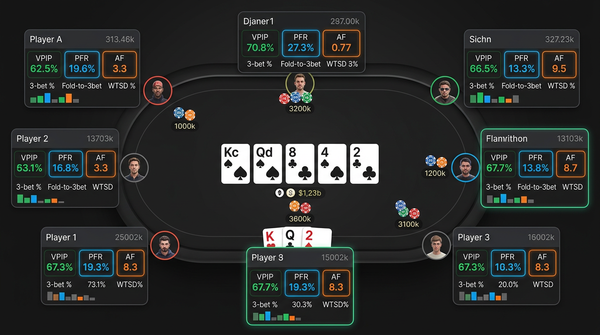
Minimal (4 stats): VPIP / PFR / 3bet% / Total Hands. Targeted at brand-new HUD users who don't yet know what most stats mean. I wouldn't use this beyond the first month.
Standard (8 stats): Adds Fold-to-3bet% / AF / WTSD% / Steal%. This is the layout I'd recommend for most NL10-NL100 players. Enough information to make better decisions, not so much that you're cognitive-overloaded mid-hand.
Comprehensive (12 stats): Adds Fold-to-Steal% / W$SD% / 4bet% / BB/100. This is the layout I use on the travel laptop. It's almost identical to my main HM3 layout in terms of which stats are visible.
Tournament (10 stats): Tournament-specific replacements — push/fold frequencies, ICM-aware stats, etc. I haven't used this much.
Custom (start from blank): Build from scratch. The interface for this is competent but not as polished as HM3's visual designer.
The Comprehensive template's stat selection is reasonable but the color thresholds out of the box are too narrow at higher stakes. At NL200+ population is tighter than DriveHUD's defaults assume, so almost every villain shows as "loose" by the defaults. I tightened my color thresholds within the first session and recommended any NL200+ user do the same.
The popups behind the main stats are simpler than PT4's or HM3's. They cover the basics — positional breakdown, postflop frequencies — but don't go as deep. Adequate for in-session reading, less so for review work.
Site-Specific Notes
Since DriveHUD's distinctive value prop is supporting US-facing networks, let me give specific notes on how it performs on each.
WPN (ACR, Black Chip, etc.): The most reliable platform for DriveHUD. Hand histories import cleanly, HUD overlay is stable, multi-tabling at 8-12 tables works without lag. This is DriveHUD at its best.
Bovada/Ignition: The scraping workflow works most of the time. When it works, it's the only credible option in the category. When it breaks (typically after a Bovada client update), it can be down for days or weeks until DriveHUD ships a patch. If you play here, factor in periodic outages.
partypoker: Works in most regions where party is available. The European versions seem more reliable than the US-facing ones. HUD experience is solid.
Chico Network: Adequate. Less polished than WPN support but functional.
PokerStars and GG: Don't bother trying. PokerStars' TOS restrictions and GG's HUD blocking make DriveHUD a non-starter on these networks. Use PT4 for Stars; use the limited HUD GG allows for GG.
What I'd Tell Someone Buying DriveHUD For The First Time
Practical gotchas.
The free trial is generous and you should use the entire 30 days before paying. Verify the product works on your specific site, with your specific table count, with your specific OS version. Most users who later complain that "DriveHUD doesn't work on X" didn't test thoroughly during the trial.
The Lifetime license is genuinely cheaper than the annual subscription if you'll use the tool for 4+ years. The math is simple: $349 lifetime vs $396 over 4 years of annual subscriptions. If you're confident you're sticking with DriveHUD long-term, take the lifetime option. If you might switch to a competitor in 1-2 years, take the annual.
The Bovada/Ignition scraping mode requires the poker client to be visible on screen. If you minimize the client, scraping stops. This affects how you can multi-task during sessions.
Color threshold defaults are wrong for higher stakes. Tighten them in your first session if you play NL200+. Without this adjustment everyone looks loose.
The leak detector's findings are useful for new players and mostly already-known for experienced players. Don't over-rely on it as your primary study mechanism.
How DriveHUD Fits Into A Broader Study Stack
DriveHUD as a primary tracker fits a specific player profile: someone who values setup speed, plays on supported sites, and doesn't need deep analysis tools. Their study stack typically looks like:
- DriveHUD as the tracker and HUD
- A solver subscription (GTO Lab, GTO Wizard, or PokerSnowie) for spot work
- A video subscription (Poker Academy, PokerCoaching) for concepts
- Their own play volume
This stack is competitive with what serious players run. You're not handicapped by using DriveHUD as the tracker as long as your study workflow doesn't require deep filter work.
DriveHUD as a secondary tracker (my use case) fits a different profile: someone who has a primary setup with PT4 or HM3 and wants a lighter solution for travel or backup. The two trackers don't share data, so you live with the inconsistency.
DriveHUD as a complement to another tracker on the same machine doesn't really work. The two products will fight over hand history files and you'll get duplicate imports or missing imports. Pick one per machine.
After Eight Months: Has My Travel Winrate Changed?
I track travel sessions separately because they're typically 1-2 hour sessions in less-than-ideal conditions (hotel WiFi, smaller monitor, more distractions).
Pre-DriveHUD travel sessions (early 2025, no HUD on the laptop): -0.4bb/100 over about 30 hours of play.
Post-DriveHUD travel sessions (late 2025 through May 2026): +3.2bb/100 over about 80 hours of play.
That's a significant swing but the sample is small enough that I'd be careful claiming attribution. The HUD certainly didn't hurt, and it probably helped against opponents I'd never seen before since I had real-time stats on them. Whether the gain is purely from having a HUD vs from generally being a better player six months later is hard to disentangle.
The honest interpretation is "having a HUD on travel sessions is better than not having one, and DriveHUD is the easiest HUD to maintain on a travel setup." That's enough to keep the subscription.
Verdict: The Right Pick For Specific Use Cases
After 8 months of running DriveHUD 2 alongside HM3, my conclusion is that DriveHUD is the right choice for two specific player profiles:
-
Players on Bovada/Ignition or other US-facing networks where the alternatives don't work or work poorly. For these players DriveHUD isn't really competing with PT4 and HM3 because PT4 and HM3 aren't viable. It's the best option in its category by default.
-
Players who value setup speed and HUD UX over deep analysis tools. If your study routine is "review my session afterward in the replayer and look at the leak detector occasionally," DriveHUD is a better fit than PT4 or HM3. You get a clean HUD without spending a weekend configuring it.
For everyone else — serious analytical players, GG/PokerStars regulars, anyone who maintains a large hand history database and runs custom queries — PT4 is still the better long-term pick and HM3 is the better day-to-day HUD experience. DriveHUD's analysis ceiling is real and you'll hit it within months if you're a serious analyst.
The pricing math depends on your horizon. If you're sure you'll keep using DriveHUD for 4+ years, take the Lifetime license at $349. If you're not sure, pay annually at $99 — that's still less than a single weekend of poker losses for most players above NL50.
I won't switch to DriveHUD as my primary tracker because the analysis depth gap matters to me. I'll keep using it on my travel laptop because the setup speed and HUD UX matter on a secondary machine. Different tools for different jobs.
If you've never used a tracker before and you're on a supported site, the 30-day DriveHUD trial is a low-risk place to start. You'll know within a week if it fits you. If it does, you've found the easiest-to-live-with HUD in the category. If it doesn't, you've spent zero dollars and learned what features you actually need from a tracker — useful information when you go shopping for the next product.