Hold'em Manager 3 HUD Setup: The Walkthrough I Wish I'd Had
Setting up Hold'em Manager 3 in 2026? Here's the install, hand history, HUD layout, and NoteTracker config from someone who's used HM3 across multiple sites.
Hold'em Manager 3 HUD Setup: The Walkthrough I Wish I'd Had
I switched from PokerTracker 4 to Hold'em Manager 3 in early 2024 because I wanted to try the more polished in-game HUD that everyone kept talking about. The switch took me an entire weekend. Not because HM3 is hard — it isn't. But because I underestimated all the small things you have to redo: rebuild your custom popups, recalibrate your stat color coding, retrain your eyes on a slightly different layout, and re-import a million-hand database into a different schema.
I ended up running both HM3 and PT4 in parallel for a month, decided HM3 had genuinely better in-game polish but slightly worse analysis tools, and eventually went back to PT4 for the database work while keeping HM3 for live sessions. That's a luxury most players don't have. So before you buy HM3, let me walk you through the setup so you know what you're actually committing to.
This guide covers a full HM3 install from scratch in 2026, configuring auto-import, building a HUD layout that's actually useful at the table, setting up NoteTracker (which is HM3's killer feature), and avoiding the gotchas I hit. If you're coming from PT4, I'll also call out the differences so you don't waste time looking for features in the wrong place.
Hold'em Manager 3 is a $99 one-time purchase in 2026, no subscription. Same price as PokerTracker. If you've never bought a tracker before and you're trying to decide between them, that's a separate article — this one assumes you've decided HM3 is the one you want.
The Install: Smoother Than It Used to Be
The HM3 installer in 2026 is a clean experience. Download from the official site, run the installer, click through the wizard. About five minutes total.
A few things to know during install:
Database choice. HM3 uses PostgreSQL by default in 2026. There's no SQLite option anymore for new installs (PT4 still offers it). This is actually good — PostgreSQL handles large databases much better. The installer will set up PostgreSQL automatically; you don't need to know anything about it. You'll see a step where it says "Installing database server" and that's PostgreSQL going in. Let it run.
Antivirus interference. Some antivirus tools flag HM3's table-scanning behavior as suspicious. If your install completes but the app won't launch, or it launches but can't see poker tables later, check your antivirus's quarantine and whitelist HM3.
Multiple monitors. If you run multiple monitors, install HM3 with the primary monitor set to where you'll usually have it open. This affects some default window positioning. You can fix it later but it's easier to set right at install.
When HM3 launches for the first time, it'll prompt you to enter your license key from the purchase email. Activation is online and takes a few seconds. You'll then be in the main interface.
The HM3 interface is significantly more modern than PT4's. Cleaner panels, better typography, a sidebar navigation that makes sense. If you've used PT4 you'll notice the difference immediately. Whether that visual polish matters to you depends on how much time you spend in the analysis tools — I find it nicer for browsing hands, not meaningfully different for serious filter work.
Hand History Setup and Site Configuration
This is the most failure-prone step in any tracker install. HM3's auto-detection in 2026 covers the major sites well, but always verify.
Navigate to Site Setup from the main menu. You'll see a list of supported sites — PokerStars, GG Network, partypoker, Winamax, 888, WPN, and a few more. Find your site and click "Configure."
The site configuration window has a few panes:
Hand history folder. HM3 will guess the correct path. Verify it by clicking "Browse" and confirming there are .txt or .xml files inside. The standard locations:
- PokerStars on Windows:
C:\Users\[YourName]\AppData\Local\PokerStars\HandHistory\[YourScreenName] - PokerStars on Mac: see Mac section below — HM3 has different recommendations
- GG Network:
C:\Users\[YourName]\AppData\Roaming\GGNetwork\HandHistory - partypoker:
C:\Users\[YourName]\AppData\Local\partypoker\Hand Histories - Winamax:
C:\Users\[YourName]\AppData\Roaming\winamax\documents\accounts\[YourScreenName]\history
If your hand history folder is empty, your poker client isn't writing hand histories. Open the poker client, find Settings > Hand History (or similar), and enable "Save my hand histories" with text format selected.
Auto-detect screen names. HM3 will scan the hand history folder for screen names you've used. Confirm yours appears here. If you have multiple accounts on the same site (different screen names), add each one.
Currency. Default is USD. Change if needed — this only affects display, not import.
Game type filters. You can choose to import only certain game types (e.g., only NLHE cash, ignore tournaments). Most players want everything imported and can filter later in reports. Leave defaults unless you have a reason.
Click "Save" and toggle auto-import on at the top of the main window. There's a clear indicator that says "Auto-Import: ON" in green.
Test it now. Open your poker client, sit at a table, play one hand. Then check HM3 — within 30 seconds, the hand should appear in your "Recent Hands" or session view. If it doesn't, your hand history path is wrong, your client isn't saving histories, or there's a permissions issue with HM3 reading the folder.
For Mac users specifically: HM3's Mac support in 2026 is via a wrapper, not native. PokerTracker 4 has cleaner native Mac support. You can run HM3 on Mac but you'll go through CrossOver or similar, which adds complexity. If you're a Mac primary user and you don't have a strong reason to choose HM3, PT4 is the easier setup.
Importing Existing Hand Histories
If you have months or years of accumulated hand history files (or you're migrating from PT4 and want to import its database), HM3 has tools for both.
Importing raw hand history files: File menu > Import > Import Hand Histories. Browse to the folder containing your .txt files. Select all files (Ctrl+A) or use "Import Folder" for nested directories. The import process can take hours for large databases — let it run overnight if you're importing more than 500,000 hands. Don't interrupt it.
Migrating from PT4: HM3 includes a PT4 database import wizard. It reads your PT4 PostgreSQL database directly and copies the hands across. The migration preserves notes (mostly) but loses some custom tags and stats. Plan to spend a day verifying the migration if you have a large PT4 database. I'd recommend keeping your PT4 install as a backup for at least a month after migration in case something is missing.
Hand history retention from your poker site: Most sites only keep 30–60 days of hands locally. If you've never tracked before, that's all you'll be able to import on day one. Some sites (PokerStars, GGPoker) let you request older hand histories through customer support — usually delivered as a zip file via email within a few days. Worth doing once for any serious player.
After import, run Database > Optimize. This rebuilds indexes and makes future queries faster. On a large database it can take 30–60 minutes. Do it after every major import.
NoteTracker: The Feature Most New Users Underuse
If there's one thing HM3 does better than PT4, it's NoteTracker. This is the structured note-taking system that lets you build proper opponent profiles over time. It's worth setting up properly on day one.
Open NoteTracker from the main navigation. You'll see categories like "Style," "Notes," "Color." The system is built around two ideas: predefined notes (templated phrases you reuse) and color tags (visual classifications).
Set up your color scheme first. I use:
- Green: solid TAG, default-correct opponents, slight edge
- Blue: tight nit, easy to bluff but folds rarely showdown
- Yellow: LAG, aggressive but not crazy, requires attention
- Orange: spewy LAG, frequent overbets and bluffs, value bet wider
- Red: maniac or major leak, target for value, never bluff
You can use whatever scheme makes sense to you. The point is consistency — once you set it, use it the same way every time. After 6 months you'll be able to read a table at a glance based on color alone.
Set up auto-color rules. This is the magic. NoteTracker can auto-assign colors based on stats. Example rules I run:
- VPIP > 35 AND PFR < 12: orange (loose-passive)
- VPIP > 40 AND aggression > 3: red (maniac)
- VPIP < 16 AND PFR < 12 AND fold-to-3bet > 75: blue (nit)
- VPIP 18-25 AND PFR 14-22 AND 3-bet 6-10: green (TAG)
These rules apply automatically as you accumulate hands on opponents. You sit at a table and the colors tell you who's who without you having to look at numbers. Configure these once and they pay off for years.
Predefined notes. These are templated tags you can apply with a click. I have notes like "limp-3bets AA/KK," "open-folds to large 3-bet," "double barrels rivers light," etc. Quick to apply, scannable later. Beats writing freeform notes you'll never re-read.
NoteTracker is the killer reason to choose HM3 over PT4 if you play against the same opponents repeatedly (small sites, regular cash games). PT4's note-taking is functional but flat; HM3's is structured and queryable.
Building the In-Game HUD
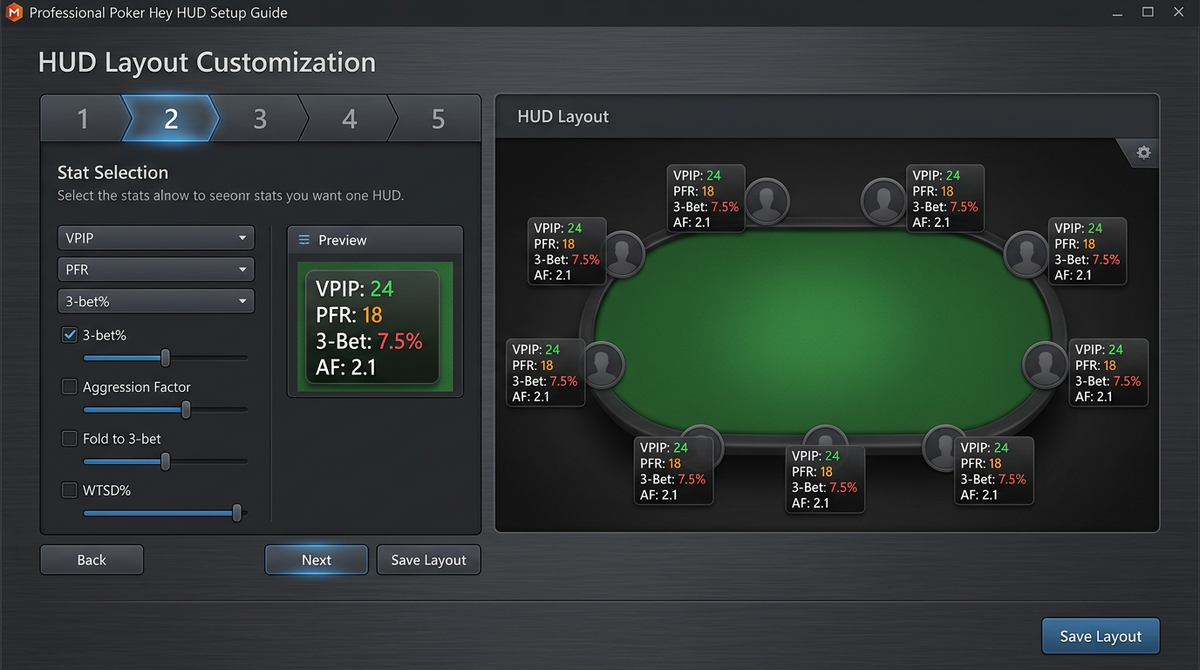
HM3's HUD editor is more visual than PT4's. You drag elements onto a layout and configure them with property panes. Once you get used to it, it's faster than PT4's spreadsheet-style stat list.
Go to HUD Manager > Edit HUD Profile. You start with a blank layout for each table size (6-max, 9-max, heads-up).
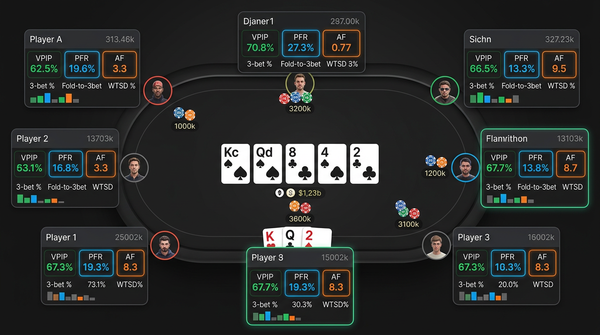
The HUD I run on HM3 for 6-max NL cash:
Top row (always visible):
- Hands count (sample size)
- VPIP / PFR (one stat with slash format)
Middle row:
- 3-bet preflop
- Fold to 3-bet
- Steal % (BTN/SB)
Bottom row:
- Cbet flop
- Fold to cbet flop
- Aggression frequency (postflop)
That's seven stats spread across three lines. It looks busier than a single-line layout, but HM3's text rendering is sharper than PT4's so it's still readable at the table. If I'm 6+ tabling, I switch to a stripped-down 2-line version.
Color coding: HM3 has more flexible color rules than PT4. I set up:
- VPIP: green 18-25, yellow 26-32, orange 33-40, red 41+
- PFR: green 14-22, yellow 11-13 or 23-26, orange below 11 or above 27
- 3-bet: yellow 5-9, orange 10-14, red 15+
These let me read player types at a glance. A guy with green VPIP/PFR and yellow 3-bet is a default TAG. A guy with red VPIP and orange PFR is a LAG who probably isn't 3-betting enough relative to his open frequency.
Popups: This is where HM3's design shines. The popup editor lets you build tabbed views with arbitrary stat groupings. My popup has four tabs: Preflop, Flop, Turn, River. Each tab has 15-20 stats organized by position or sizing.
Building this initial popup takes 45–60 minutes if you do it from scratch. Save it once, use it forever. I recommend cloning HM3's "Advanced" template and modifying rather than starting blank — saves time and you'll learn the editor by editing.
Multi-tabling adjustments. Build separate HUD profiles for different table counts. My layouts:
- 1–4 tables: full layout with three rows
- 5–8 tables: compact two-row layout
- 9+ tables: minimal one-row, color-only
Switch between profiles with a hotkey. HM3 makes this easy.
Stat Selection: What Actually Matters
Both HM3 and PT4 ship with hundreds of stats. Most are useless. Here's the small set I actually use, and why.
Core preflop (every player gets these): VPIP, PFR, 3-bet, fold to 3-bet, 4-bet, fold to 4-bet, steal, fold to steal.
Core postflop: Cbet flop, cbet turn, cbet river, fold to cbet by street, check-raise flop, donk bet flop, AF or AFq.
Position-specific (in popup only): RFI by position, defense vs steal by position, 3-bet by position.
Sizing-related (advanced, popup only): Bet sizing distribution on each street, river bet sizing percentiles.
Custom stats I built:
- "Fold to delayed cbet" — folds turn after I check back flop
- "Bluffs river when checked to" — river bet frequency when villain checks turn
- "Limp-3bet frequency" — for live players, useful indicator of trap range
You don't need all of these on day one. Start with the core preflop set, add postflop after 30 days, build custom stats when you find specific spots you want to study.
A note on sample sizes: HM3 lets you set minimum opportunity thresholds before stats display. I use 50 for most postflop, 100 for 3-bet defense, 30 for steal stats. Below threshold, the stat shows as "—" instead of a misleading number from a tiny sample.
Mac Setup Notes
If you're running HM3 on Mac, you're going through a Windows compatibility layer. Either CrossOver, Parallels, or a similar tool. There's no native Mac version as of 2026.
Steps:
- Install CrossOver or Parallels (paid software, separate from HM3).
- Within the Windows environment, install HM3 normally.
- Configure HM3 to point at hand history folders that are accessible from the Windows side. This is fiddly — you'll likely want to set up a shared folder between Mac and the Windows VM where your poker client writes histories.
- Performance is generally fine but slightly slower than native Windows.
Honestly, if you're a Mac primary user, PokerTracker 4 has clean native Mac support and you should consider it instead. The HM3 in-game polish advantage doesn't survive the wrapper experience.
Comparison Tables
| Setup task | HM3 specifics | Time required |
|---|---|---|
| Install | Auto-installs PostgreSQL | 5–10 min |
| Site config | Per-site folder + screen name | 5 min per site |
| Hand history import | Overnight for large databases | Background |
| HUD layout | Visual drag-drop editor | 45–60 min for solid first pass |
| NoteTracker setup | Color rules + predefined notes | 30–45 min, pays off long term |
| Popup config | Tabbed multi-pane editor | 60+ min for comprehensive setup |
| Mac install | Requires wrapper | Add 30 min for wrapper config |
| HM3 vs PT4 in setup | HM3 | PT4 |
|---|---|---|
| Database default | PostgreSQL forced | SQLite or PostgreSQL choice |
| Native Mac | No (wrapper) | Yes |
| HUD editor style | Visual drag-drop | Stat list |
| Note-taking | NoteTracker (structured) | Basic text |
| In-game HUD polish | Better out of box | Requires more customization |
| Database analysis depth | Very good | Slightly deeper |
| Migration tools | Imports from PT4 | Imports from HM2 |
| Stat category | Use it for | Sample size needed |
|---|---|---|
| VPIP / PFR | Player type identification | 50+ |
| 3-bet preflop | Light vs polarized 3-bet read | 100+ |
| Fold to 3-bet | Bluff 3-bet decisions | 50+ opportunities |
| Cbet by street | Bluff catching | 30+ opportunities |
| Steal % | BB defense decisions | 100+ |
| AF / AFq | Postflop tendencies | 100+ |
| Position-specific RFI | Range estimation | 75+ per position |
First Session Verification
Before you trust the setup with real money, do this five-minute check:
- HM3 open, auto-import on (green indicator at top).
- Open poker client, navigate to a table.
- HUD overlay should appear within 5–10 seconds (no stats yet for new players).
- Sit, play 5–10 hands.
- Check HM3's session view — your hands appear in real time.
- Check your own seat — your VPIP/PFR should match what you actually played.
All five steps green? You're good to grind. Any failure? Debug from that point.
Things I Wish I'd Known Before Switching to HM3
A short list of gotchas I hit during my switch from PT4 in 2024.
Custom stats don't migrate. The PT4 import wizard handles standard stats and notes well. Anything custom (built-up over years) has to be rebuilt manually in HM3's stat editor. Plan for 2–4 hours of rebuilding if you had a meaningful library.
Filter syntax is different. PT4's filter expressions don't translate directly. You'll spend a few sessions getting used to HM3's filter logic. The capabilities are similar but the language differs.
The replayer is genuinely better. This isn't a complaint, this is a "wish I'd known earlier." HM3's hand replayer is significantly cleaner than PT4's. I now do a lot more session reviews because the replayer doesn't fight me.
NoteTracker is worth the migration alone. I underestimated how much I'd use the structured notes. Six months in, I have richer opponent profiles than I built in five years on PT4.
The default popups are still bloated. Don't skip the popup customization step thinking the defaults are fine. They're not. Spend the hour.
Backups matter. Same as PT4 — set up daily backups to an external drive or cloud folder. Database corruption happens to everyone eventually.
Common Issues and Fixes
HUD not appearing on tables: Check auto-import is on. Check antivirus isn't blocking HM3's table scanning. On Mac wrapper setups, check that the wrapper has access to the poker client's window properties.
Stats look wrong for me: Verify the screen name in HM3 matches your poker site screen name exactly. Case-sensitive.
Hands not importing: Check the hand history folder path. Verify your poker client is set to save hand histories. Some clients have a separate "tournament summary" save option that's distinct from "hand history" — make sure both are on if you play tournaments.
HM3 crashes on launch: Usually a database issue. Run Database > Repair from the launch menu. If unfixable, restore from backup.
Slow stat queries: Run Database > Optimize. Schedule it weekly for active databases.
Popup not showing all stats I configured: Check sample size thresholds — stats with insufficient opportunities won't display. Lower the threshold if you want to see early.
Final Thoughts
HM3's setup is more polished than PT4's, but the same fundamental work has to happen: configure auto-import, build a HUD that's actually useful, customize popups for the specific stats you care about. None of this is hard, but it's a few hours of setup that most players rush through and regret.
The single biggest payoff in HM3 is NoteTracker. If you don't set up structured notes and color rules, you're paying for HM3 and getting PT4. The note system is the defining feature; use it.
If you've installed HM3, configured a site, built a HUD, and set up NoteTracker — you're now using maybe 30% of what HM3 can do. The rest comes from running it for months, learning what stats actually inform your decisions, and refining the layout based on what you find yourself looking at. Don't try to do everything on day one.
Hold'em Manager 3 at $99 one-time is, like PT4, one of the best values in poker software. Buy it once, use it for years, never deal with subscription friction. The setup time you invest now compounds over every session you'll ever play. Get it right this weekend, and the next 10,000 hands will run smoother than the last.
If you're still on the fence between HM3 and PT4, my honest take: try the trial of each. The interfaces feel different enough that one will click for you. The "right" answer is the one you'll actually open after every session. The best HUD is the one you use; the worst is the one that sits in your tray while you play untracked.
Six Months In: What HM3 Actually Becomes
The HM3 install you finish this weekend is not the HM3 you'll be using six months from now. Real-world usage reshapes the config in ways that aren't obvious upfront. Here's what changed for me between month one and month six.
NoteTracker became my most-used feature, not the HUD. I expected the in-game stats to drive most of the value. What actually happened: I started recognizing players I'd tagged six months earlier and the structured notes were what told me how to play against them, not the live stats. By month three I was tagging every reg I played twice or more. By month six I had a richer opponent database than I'd built in five years on PT4.
The popup got simpler, not more complex. My day-one popup had four tabs and 60 stats. By month six it was three tabs and 35 stats. I'd dropped everything I never actually clicked on. The dropped stats weren't useless — they were just things I didn't reach for under time pressure. The popup became a tool for in-session decisions, not a comprehensive reference.
Color rules got tighter. My initial color thresholds (VPIP green 18–25, etc.) drifted as I noticed they were over-classifying the population I played against. I narrowed the green band so that only true TAGs showed green and most everyone else fell into yellow. Made the colors more informative.
Database optimization needed to become routine. After six months of accumulating hands, queries that took 0.5 seconds at install were taking 2–3 seconds. Running Database > Optimize weekly fixed it. I now have it on a calendar reminder.
The replayer became my primary review tool. PT4 has a serviceable replayer; I rarely used it. HM3's is good enough that I switched my entire review workflow over to it. By month six I was doing 80% of my session reviews in the replayer rather than reading text histories.
A Real Week of HM3 Usage in 2026
What my actual schedule looks like, no idealization.
Sunday morning, 30 min. Open HM3. Run my saved "Weekly Drift" report — six panes covering my key stats vs my baseline. Identify anything that's moved. Set the week's study focus.
Sunday afternoon, 60 min. Pull example hands related to whatever moved. Review them in the HM3 replayer. NoteTracker any new opponents I encountered.
Monday through Friday play sessions. After each session, two minutes of housekeeping: tag the session, drop quick NoteTracker notes on any opponents who did something memorable, verify auto-import worked.
Wednesday evening, 30 min. Mid-week temperature check. Pull the past 3 days, look at biggest losing hands, decide whether each was reasonable or a leak.
Friday evening, 45 min. End-of-week deep review. Three hands through GTO Lab, notes added to my running leak doc.
Saturday, no HM3. Brain rest.
Total HM3 time outside of play: about 3 hours per week. Same ratio I had on PT4, slightly different distribution. The replayer is faster on HM3, which means I review more hands in the same time budget.
NoteTracker Workflow That Actually Works
Most people who pay for HM3 underuse NoteTracker. They set up colors, drop a few notes, and then forget about the system. To get real value, you need a sustainable workflow.
What I do, every session, automatically:
Step one. After the session, sort my session view by money lost. The biggest losers get NoteTracker reviewed first.
Step two. For each significant opponent in those losing hands, open their popup, scroll their stats, and add or update a structured note. I have predefined notes like "donk turn light," "limp-3bets premiums," "open-folds to 3-bet OOP." One click each.
Step three. Update color tag if their behavior surprised me. The auto-color rules handle most cases, but humans deviate from their stats sometimes and the manual override matters.
Step four. For any opponent I expect to play again soon, write one freeform note about the read I had on them. Three sentences max. This is the note that pays off when I see them next week.
Total time per session for this workflow: 5–10 minutes. Compounds enormously over six months.
The mistake people make is trying to do this comprehensively. You don't need to NoteTracker every player every session. You need to do it for opponents who are losing you money and opponents you'll see again. That's a small subset.
HM3 Configuration Tips Most Guides Miss
Specific small things that took me months to figure out.
Pin your most-used stat layouts to hotkeys. HM3 lets you switch HUD profiles via keyboard shortcut. I have F1 = "1–4 tables," F2 = "5–8 tables," F3 = "9+ tables." Switching profiles between sessions becomes one keystroke.
Use the "Compare to Pool" feature in popups. HM3 will show you a stat alongside the pool average for the stake you're playing. The deviation is what's informative. "Fold to cbet 50%" is meaningless without context. "Fold to cbet 50% (pool 65%)" tells you villain is sticky.
Set up custom alerts for specific stat patterns. HM3 can flag a player at the table if their stats match a pattern you define. I have an alert for "VPIP > 50, AF > 4" that pops a notification when a maniac sits down. Keeps me from missing exploit opportunities.
Configure NoteTracker color override priorities. When auto-color rules conflict, HM3 picks based on rule priority. Set this manually rather than accepting defaults — you want your most specific rules to win, not the alphabetically first one.
Run database optimize weekly, not monthly. HM3's PostgreSQL backend benefits from frequent reindexing. The performance difference between weekly and monthly is noticeable past the 500K hand mark.
Back up to two locations. Local external drive plus cloud. Database corruption isn't common but it does happen, and HM3 doesn't recover gracefully from a torn write. Two backups protect against the rare case where your local backup is also corrupt.
What I'd Tell Someone Buying HM3 First Time
Direct advice from running it for two years.
Spend the first weekend on setup, not playing. The temptation is to install, fire up a table, and start grinding. Resist it. The setup work you skip now becomes a permanent half-built system you keep meaning to fix.
NoteTracker is the killer feature. If you don't use it, you're paying HM3 prices for PT4 functionality. Build your color rules and predefined notes on day one, even if they feel imperfect. Refine them over time.
The default popups are bloated. Same as PT4. Build a clean three-tab popup organized by street and ignore the templates HM3 ships with. Sixty minutes once, paying off forever.
If you're on Mac, seriously consider PokerTracker 4 instead. The HM3 wrapper experience is workable but it's a downgrade from native. The polish that justifies HM3 over PT4 doesn't survive going through CrossOver.
Don't migrate from PT4 unless you have a clear reason. The migration takes a weekend, custom stats don't transfer, and the daily UX improvement is real but small. If you're already happy on PT4, stay there. If you're starting fresh and HM3's polish appeals to you, start here.
Six months from now, your HM3 install will look meaningfully different from the day-one config. That's normal and good. The setup is the floor, not the ceiling. The work is in tuning it over time, based on what you find yourself actually using and what you keep ignoring.