PokerTracker 4 HUD Customization: A Real Guide From a 9-Year User
Stop using the default PT4 HUD. This is the actual six-stat HUD I run at NL500, why each stat matters, and how to build one that doesn't make tables unreadable.
PokerTracker 4 HUD Customization: A Real Guide From a 9-Year User
The HUD that ships with PokerTracker 4 by default is bad. I'm not going to soften that. It crams too many stats onto too small a footprint, the colour coding is nearly random, and half the stats it shows are statistically meaningless until you have several thousand hands on a player. I've watched newer players boot up PT4 for the first time, look at the default HUD, and try to play with it as-is for months before realizing they could change anything. That's the user experience I want to fix in this article.
I've been running PT4 since version 4.0 came out in 2013. I've built and rebuilt my HUD probably forty times across my online poker career. The current version, the one I'm running at NL500 right now, has six stats per player, three colour bands, and almost nothing else. It looks deliberately minimalist. There's a reason for that, and the reason is the actual point of this article: information density and decision speed are inversely correlated, and most poker HUDs solve for the wrong one.
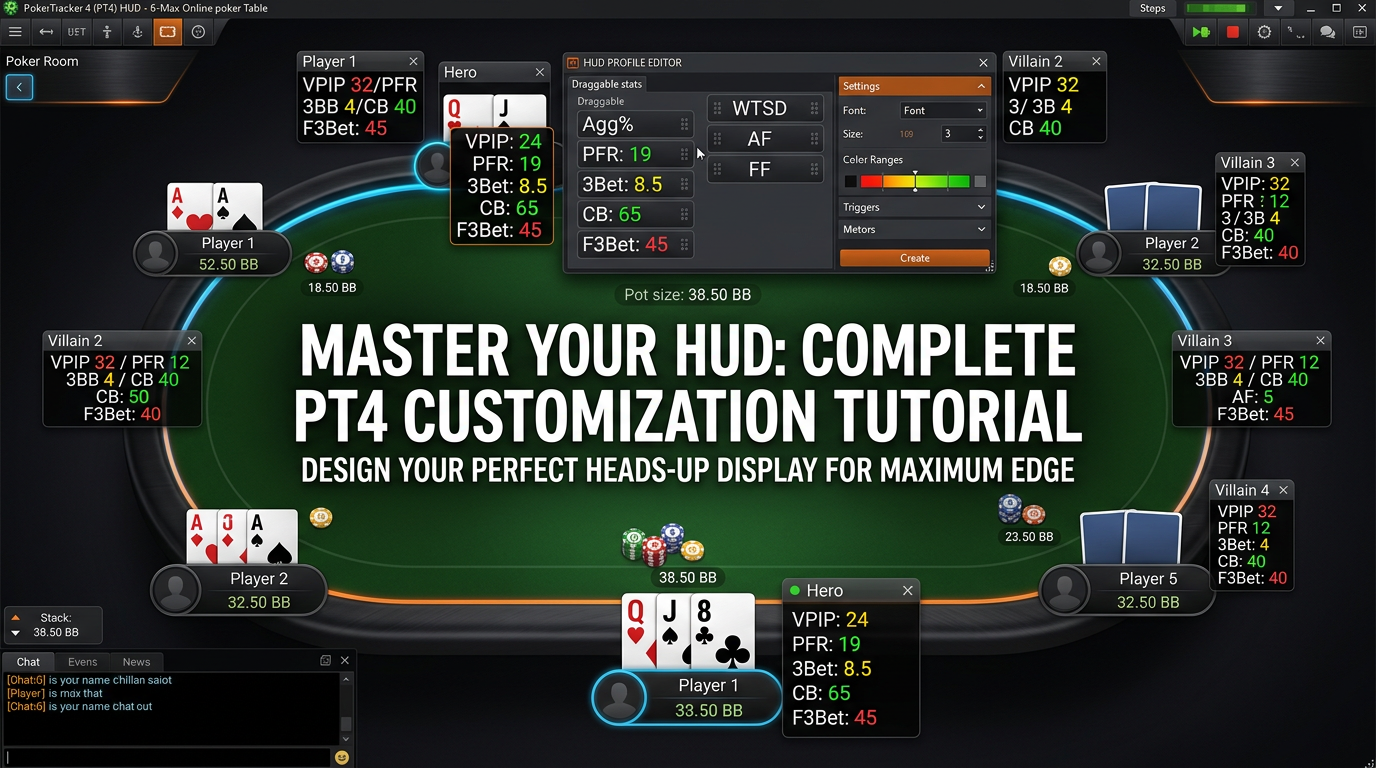
I'm Alex. Nine years grinding cash, mostly NL200–NL500 6-max from Toronto. This is how I'd build a HUD from scratch in PokerTracker 4 today, what stats I'd put on it and why, what I'd leave off and why, and the specific configuration steps in PT4 to actually do it. Bring up the HUD config window in PT4 (Configure → HUD → Edit Default HUD Profile or, better, Create New Profile) and follow along.
The philosophy: a HUD is a forcing function, not a stat dump
Before any stats, the principle.
A HUD exists to surface a small number of facts about each opponent quickly enough that you can use them in real time. The keyword is "use." Information you have but don't act on is wasted. Information that takes you four seconds to find and interpret has cost you more time than the decision is worth.
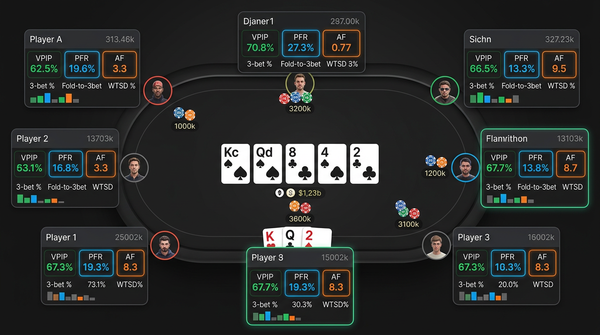
Most HUDs you'll see online — the ones in screenshots from coaching sites, the ones in pre-built HUD packs you can buy — solve for "show me everything." A "complete" HUD with 20+ stats per player tells you about VPIP, PFR, 3-bet, fold-to-3-bet, fold-to-4-bet, c-bet flop, c-bet turn, c-bet river, fold-to-c-bet, check-raise flop, donk-bet, river bet sizing, river fold frequency, WTSD, W$SD, attempts to steal, fold to steal, fold BB to steal, AF, AFq, postflop aggression by street, and on and on. That's not a HUD. That's a database query frozen onto a poker table.
The HUD I actually use shows me six stats. Six. I've been refining this number for years and I keep coming back to it. Five feels too sparse, seven starts feeling cluttered, six is the number where I can read the entire panel at a glance during a fold-to-three-bet decision without having to mentally parse anything.
Those six stats are: VPIP, PFR, 3-bet preflop, fold to 3-bet, c-bet flop, fold to c-bet flop. That's it. Everything else lives in a popup that I can pull up by hovering on the panel when I want a deeper read.
The rest of this article walks through why each of those six is on there, why everything else isn't, and how to configure the popup so the additional stats are accessible when you need them.
The six stats, in order, and why
Stat 1 and 2: VPIP / PFR
This is the single most informative pair of numbers on a HUD. VPIP (Voluntarily Put $ In Pot) is the percentage of hands a player puts money in preflop, excluding blind posts. PFR (Pre-Flop Raise) is the percentage of hands they raise preflop.
The gap between these two numbers tells you the player's basic profile in seconds.
A 24/22 player (24% VPIP, 22% PFR) is a tight aggressive reg. They raise almost everything they play. Limps and cold calls are rare.
A 40/12 player is the classic loose passive recreational. They play a wide range and call instead of raising. This is the player you want at your table and the player whose calldowns you should value-bet thinly.
A 48/40 player is a maniac. Wide range, very aggressive. You can play merged ranges against them and look to call down lighter than equilibrium suggests.
A 16/14 player is a nit. Tight, aggressive, capped postflop ranges. Bluff them more on big runouts than you would a balanced opponent.
I show VPIP first, PFR second, separated by a slash. That's a convention almost every PT4 user uses. If you're going to deviate from it, the only argument is showing PFR first to emphasize aggression, but the standard order is so universally readable that I wouldn't change it.
To configure these in PT4: in the HUD profile editor, drag "VPIP" and "PFR" into your panel. Set the format to show one decimal place at low sample sizes and zero decimals at higher samples — there's a "format string" field you can use, but the default of just showing integers is fine for most use.
Stat 3: Preflop 3-bet
The percentage of hands a player 3-bets when they have the opportunity. This stat captures the player's aggression in spots that matter — most pots either go single-raised-pot or 3-bet-pot, and knowing whether a player is 3-betting 3% (very tight) or 11% (very aggressive) changes how you defend your opens.
A 3% 3-better is essentially never bluffing. When they 3-bet, you fold most of your range and call only with strong holdings.
An 11% 3-better is bluffing a real chunk of the time. You can 4-bet light, you can call wider, you can flat with marginal hands and try to flop well.
I display 3-bet preflop as a single number with no decimals at most sample sizes. PT4's default labeling is fine.
The trap with 3-bet stat: small sample sizes are wildly noisy. A player who's 3-bet 1 hand in 10 opportunities reads as "10%" but means basically nothing. PT4's HUD will show this stat in a "low sample" colour if you set it up right, and you should — it's the difference between "this guy 3-bets a lot" and "this guy might or might not 3-bet a lot, I don't know yet."
Stat 4: Fold to 3-bet
The percentage of opens that a player folds when 3-bet. This is the counterpart to your 3-bet stat — when you 3-bet a player, what does this number tell you?
A 75% fold-to-3-bet means almost every 3-bet is profitable as a pure bluff. You can 3-bet wide for value and bluff against this player.
A 45% fold-to-3-bet means they're defending wide. You should 3-bet for value and reduce your bluff frequency.
A 30% fold-to-3-bet means they're calling almost everything down. Don't bluff. 3-bet for thin value.
This stat pairs naturally with stat 3 (your opponent's 3-bet frequency) in your mind because together they tell you the texture of preflop play against that player.
PT4 has both "Fold to 3-bet preflop" and the more specific "Fold to 3-bet from BTN vs CO open" type filters. Use the general "Fold to 3-bet preflop" stat for the HUD; the positional breakdowns belong in the popup.
Stat 5: C-bet flop
The percentage of flops on which a player continuation-bets after raising preflop and being called. This is the most useful single postflop stat you can put on a HUD.
A 75% c-bet flop player is c-betting basically every flop. You can float wide, you can check-raise as a bluff, you can call light and lead the turn when they check back.
A 45% c-bet flop player is being more selective. When they bet, they have something. When they check, they have given up.
A player at 60% is in the equilibrium-ish zone where you mostly just play your hand strength.
I display c-bet flop as a single number with no decimals.
Stat 6: Fold to c-bet flop
The complement to the previous stat. When you c-bet the flop, what percentage of the time does this player fold?
A 65% fold-to-c-bet means c-betting is profitable as a pure bluff. C-bet wide.
A 40% fold-to-c-bet means they're defending wide. Reduce c-bet frequency, especially with weak hands.
A 30% fold-to-c-bet means they're calling almost any c-bet. Don't bluff. C-bet only for value.
These last two stats together (c-bet frequency + fold to c-bet) tell you the postflop texture of the player. Combined with the four preflop stats, you have a complete-enough profile to make most decisions in real time without thinking too hard.
What I deliberately left off
This is the more important section. The stats I do not put on my HUD, and why.
Total hands sample size. Some HUDs show this prominently. I find it distracting. PT4's stat colour coding (which fades stats that are based on small samples) does the job better than a hard number. I check sample size only when I'm explicitly questioning a read, and the popup gives me that.
WTSD (Went to Showdown) and W$SD (Won at Showdown). Useful stats but they're noisy at the sample sizes I usually have on opponents (200–2000 hands). They live in the popup. The decision contexts where these stats actually matter (deciding whether to value-bet thinner on the river, deciding whether to bluff a calling station) are infrequent enough that I don't need them on the main HUD.
Postflop aggression frequency (Aggression Factor / AFq). Hard to interpret in real time. Aggressive players have high numbers but so do bluffy players who are bluffing wrong. I look at this stat in retrospective analysis but not while playing.
Steal-related stats (attempt to steal, fold BB to steal, fold SB to steal). These matter mostly in tournament play where short-stack steal decisions are common. In cash, the relevant info is mostly captured by VPIP/PFR and 3-bet stats. Adding three more stats for marginal information is bad ROI.
River-specific stats (river bet, river fold to bet, river check-raise). Important spots, but the sample sizes are usually low and the stats are noisy. Popup territory.
Donk-bet stats. Almost never relevant at the stakes I play. Most players don't donk-bet enough for the stat to be meaningful. Cut.
Limp / open-limp stats. If a player is limping a lot, you'll know from the VPIP/PFR gap. Don't need a separate stat.
The pattern: a stat earns its place on the HUD only if (a) the underlying frequency is high enough that I'll have a meaningful sample within 100–200 hands, and (b) the stat changes my decisions often enough that having it visible saves me time.
The popup: where everything else lives
PT4's HUD popup is the secondary feature most users underuse. When you right-click on a player's HUD panel during a hand, you get a configurable popup window with as many stats as you want, organized however you want them.
This is where I put everything that doesn't make the cut for the main HUD.
My popup has four tabs:
Tab 1: Preflop detail. Open raise by position, 3-bet by position, 4-bet, fold to 4-bet, cold call frequency, squeeze frequency. About a dozen stats organized in a grid by position (UTG, MP, CO, BTN, SB, BB).
Tab 2: Postflop frequencies. C-bet flop / turn / river by various pot types (single-raised, 3-bet, 4-bet). Fold to c-bet by street. Check-raise frequencies. Probe bet frequencies. About fifteen stats.
Tab 3: Showdown stats. WTSD, W$SD, WSF (won when saw flop), aggression frequency by street, river bet sizing buckets.
Tab 4: Sample sizes. Total hands, hands at this stake, hands in this pot type. So I can verify a read against the data behind it.
The popup is for active investigation: you've identified a question about a specific player and you're spending three seconds to look up the answer. It's not where the routine pattern recognition happens. That stays on the main HUD.
To configure the popup in PT4: in the HUD profile editor, click "Popup" from the panel options, then add stats to the popup window. Use the tab feature to organize them. Save the popup as a profile so you can reuse it.
Colour coding that actually helps
PT4 lets you set colour bands for any stat. This is one of the most undervalued HUD features.
The principle: colours should make extreme values pop without making normal values shouty. I use three bands per stat — red for "extreme low," white for "normal range," green for "extreme high" — with the band thresholds tuned to where my decisions actually change.
For VPIP at 6-max:
- Red: <16 (very tight, fold preflop range)
- White: 16–32 (normal range)
- Green: >32 (loose, value-betting target)
For PFR at 6-max:
- Red: <12 (passive)
- White: 12–28 (normal)
- Green: >28 (very aggressive opener)
For 3-bet preflop:
- Red: <4 (passive, polarized 3-bet range)
- White: 4–10 (normal)
- Green: >10 (light 3-better, defend wider)
For fold to 3-bet:
- Red: <50 (defending too wide, value-3-bet)
- White: 50–70 (normal)
- Green: >70 (folding too much, bluff-3-bet)
For c-bet flop:
- Red: <50 (selective, has it when bets)
- White: 50–70 (normal)
- Green: >70 (auto c-better, float wide)
For fold to c-bet flop:
- Red: <40 (calling station, value-bet only)
- White: 40–60 (normal)
- Green: >60 (folding too much, c-bet wide)
The exact thresholds depend on your stake level — at NL500 the equilibrium frequencies are tighter than at NL10 — and you'll want to adjust based on your own database. PT4's "Auto Color Range" feature can suggest defaults but I'd override them with your own observations.
The colour band setup in PT4 is in the HUD profile editor under each stat's properties. You'll see a "Color Range" or "Stat Color" option. Click in, set up your three bands, save.
Position-aware HUD: the next level
Once your basic HUD is comfortable, the next upgrade is positional displays. PT4 supports HUD profiles that change based on player position relative to the button.
I use this for two things. First, I show position-specific 3-bet stats — when I'm in the BB facing a CO open, my HUD on the CO villain shows me their CO open frequency and their fold-to-3-bet from CO specifically. This is more informative than the generic "3-bet preflop" stat.
Second, I show a streamlined HUD on the SB and BB villains that focuses on their defending tendencies (fold to steal from SB, fold BB vs BTN, etc.) rather than their full preflop profile.
Setting this up in PT4 is more involved than basic HUD configuration. You build a "Combo" stat that combines a base stat with a positional filter, then add it to your HUD profile. PT4's documentation walks through it; I'd suggest doing it after you've used your basic 6-stat HUD for a couple of months and feel comfortable with the workflow.
Common mistakes I see
A short list of HUD configuration sins, in approximate order of how often I see them.
Adding stats faster than you learn to read them. Every new stat you add costs reading time during play. Don't add a stat unless you can articulate the decision it changes.
Trusting small samples. A "70% fold to 3-bet" based on 7 of 10 opportunities is barely better than no information. PT4's colour fading helps but you also need to remember it.
Default colours that don't match your reads. The default colour bands in PT4 are generic. They probably don't match the player pool at your stakes. Override them with your own observations.
Putting stats on the main HUD that you only need once a week. River check-raise frequency is interesting. You don't need it visible during every hand. Popup it.
Copying someone else's HUD pack. Pre-built HUD packs from coaching sites are usually 20+ stats of someone else's preferences. Build your own. It takes one weekend and you'll learn more about what each stat means.
Forgetting to update the HUD as you move stakes. The stats that matter at NL10 (where players are wildly off equilibrium) are different from the stats that matter at NL500 (where most regs are within 5–10% of GTO frequencies). Re-tune.
Putting it all together: the build steps
If you're starting fresh, here's the sequence to actually build the HUD I described.
-
Open PT4. Configure → HUD → Edit Profiles. Create a new profile called "Custom 6 Stat" (or whatever).
-
Add a player panel. Set the stat layout to a single horizontal row of six cells.
-
Drag the six stats into the cells in order: VPIP, PFR, 3-Bet PF, Fold to 3-Bet, C-Bet Flop, Fold to C-Bet Flop.
-
Configure the colour bands for each stat. Use the thresholds I gave above as a starting point, adjust later.
-
Configure the popup. Add the four tabs with the stats I described, or your own variation.
-
Save the profile.
-
Apply the profile to your active site (PokerStars, GGPoker, whatever). PT4 has a per-site profile setting.
-
Open a real or replay table to verify the HUD is showing.
-
Play 200–500 hands with this HUD. Note any stat you keep wishing you had visible — it might belong on the HUD. Note any stat you keep ignoring — it doesn't.
-
Iterate. Your HUD at the end of three months should be different from the one you started with.
That's the workflow. It's not glamorous. It's not the kind of thing that makes for an exciting YouTube video. But the difference between a player using a thoughtfully-built HUD and a player using the default one is enormous over time.
The HUD isn't going to make you a winning player by itself. The thinking that goes into building the HUD — deciding what information actually matters, deciding what changes your decisions, deciding what you can ignore — is the thinking that makes you a winning player. That's the real value of PokerTracker 4's customization. Use it.
A week in my study routine using this HUD
The HUD is the in-session tool. The study routine is what makes the HUD valuable over time. Here's how the two interact in my actual week, because the HUD design choices I described above only make sense in the context of a study workflow that uses the popup and the database to fill in what the HUD intentionally leaves out.
During play. I rely entirely on the six main HUD stats for routine decisions. VPIP/PFR for opponent profile, 3-bet and fold-to-3-bet for preflop aggression decisions, c-bet flop and fold-to-c-bet flop for flop decisions. These six stats answer 80% of the questions that come up during a hand without me having to think.
During play, when something feels off. I right-click the player's HUD panel to open the popup. The popup has the deeper stats I deliberately kept off the main HUD — positional 3-bet breakdowns, c-bet by street, showdown percentages. I'm using the popup maybe two or three times per session, on hands where the standard HUD stats aren't enough to make the decision.
After the session, in PT4's reports. This is where the database really earns its keep. I pull up the session, look at any hand I bookmarked, and run the deeper stat queries that don't fit on a HUD or even a popup — things like "this villain's c-bet flop frequency in 3-bet pots specifically as the OOP player" or "his fold-to-river-overbet across all hands I have on him." The reports tab gives me access to every stat PT4 tracks, organized however I want.
Once a week, in solver work. I take a hand from the week's database, set it up in GTO Lab or whichever solver I'm running, and compare what the optimal play would have been to what I actually did. The HUD stats inform what assumptions I should make about villain's range — a 75% c-bet flop player has a different range when he bets than a 45% c-bet flop player does, and the solver work has to account for that.
The four-layer workflow — main HUD for fast decisions, popup for moderate-depth investigation, PT4 reports for post-session analysis, solver for weekly study — is what makes the six-stat HUD work. If the main HUD were carrying all the load, six stats wouldn't be enough. With the layered system, it's exactly enough.
The spots where my HUD really earns its money
Let me get specific about three poker situations where the six-stat HUD I described makes the biggest difference compared to playing without one.
3-bet decisions in late position. When I'm in the cutoff or button and someone opens to me, the decision to 3-bet is driven mostly by villain's open frequency from that position and his fold-to-3-bet stat. My HUD shows me both at a glance. A villain with PFR 16 from CO who folds 75% to 3-bets is a 3-bet bluff target with almost any two cards that have some equity. A villain with PFR 26 from CO who folds 50% to 3-bets is someone I'm 3-betting much more selectively. Without a HUD I'd be guessing.
Float decisions on the flop. When villain c-bets the flop into me, the decision to float is driven by his c-bet flop frequency and his fold to c-bet turn (which is in the popup). A villain c-betting 75% of flops who's only continuing on the turn 50% of the time is being c-bet-and-give-up with most of his flop bets. Floating wide and stabbing turns when he checks is the play. The HUD shows me the flop frequency immediately and I can pull the turn stat from the popup if I want to.
Triple-barrel bluff decisions. This is where having reliable read data actually matters. I want to know villain's fold to c-bet flop, fold to c-bet turn, and fold to c-bet river before I commit to a triple barrel as a bluff. The flop frequency is on my main HUD. The turn and river frequencies are in the popup. Pulling the popup costs me about three seconds, which is fine on the river of a big pot — that's a decision worth taking time on.
Value-betting decisions on the river. Knowing villain's WSD (Won at Showdown) percentage tells me how light he calls. A 50% WSD player calls down with bottom pair. A 60% WSD player is much more selective. This stat is in the popup and I check it before any thin value bet on the river.
What I'd tell someone customizing their PT4 HUD for the first time
If a friend asked me to walk them through their first HUD configuration, here's exactly what I'd say.
Start by deleting the default HUD profile. Don't try to modify it — start fresh. The default is built around showing you everything PT4 can show you, which is the wrong design goal.
Pick five stats first, not six. The six-stat HUD I described took me years to converge on. Starting with five gives you breathing room to add the sixth later if you find yourself wanting it. Recommended starting five: VPIP, PFR, 3-bet preflop, c-bet flop, fold to c-bet flop. Add fold to 3-bet later once you've used the basic five for a month.
Set up the colour bands using my thresholds as a starting point but adjust to your stake level. The thresholds I use at NL500 don't apply at NL10 — the player pool is wildly different, the equilibrium frequencies are different, and the colour bands should reflect what's actually unusual in your specific pool.
Spend two hours setting up the popup before your first session with the new HUD. The popup is where everything else lives, and if you don't set it up properly you'll find yourself wishing for stats during a hand and not having them. Even a basic popup with positional 3-bet stats and c-bet by street is enough to start.
Play 500 hands with the new HUD. Just play. Don't tweak. Notice which stats you keep wanting and don't have, and which stats you keep ignoring. That's your data for the next iteration.
After 500 hands, iterate. Add the sixth stat if you've been wishing for it. Move stats around if the order doesn't read naturally. Adjust colour bands based on what's actually showing up green and red in your real games. The HUD you build in week one should be different from the HUD you have in month three.
Don't compare your HUD to other people's HUDs. Every winning poker player I know has a slightly different HUD configuration that reflects their decision process. Mine works for me; yours should work for you. The point is the thinking, not the stats.
That's the conversation. Most players who fail to build a useful HUD fail because they tried to copy someone else's configuration instead of converging on their own. The customization tools in PT4 exist for a reason. Use them, iterate, and trust that the HUD you arrive at after three months of refinement will be more useful than any pre-built pack you could buy.